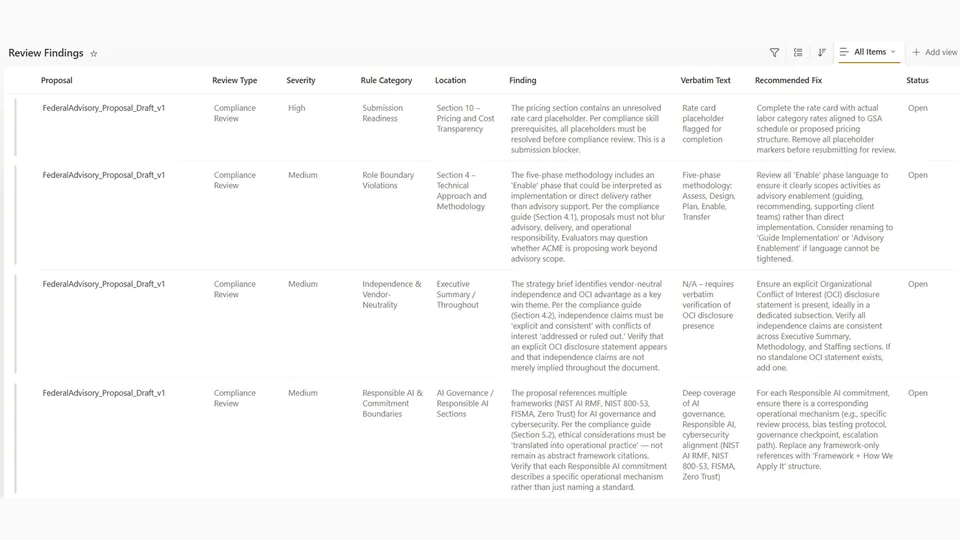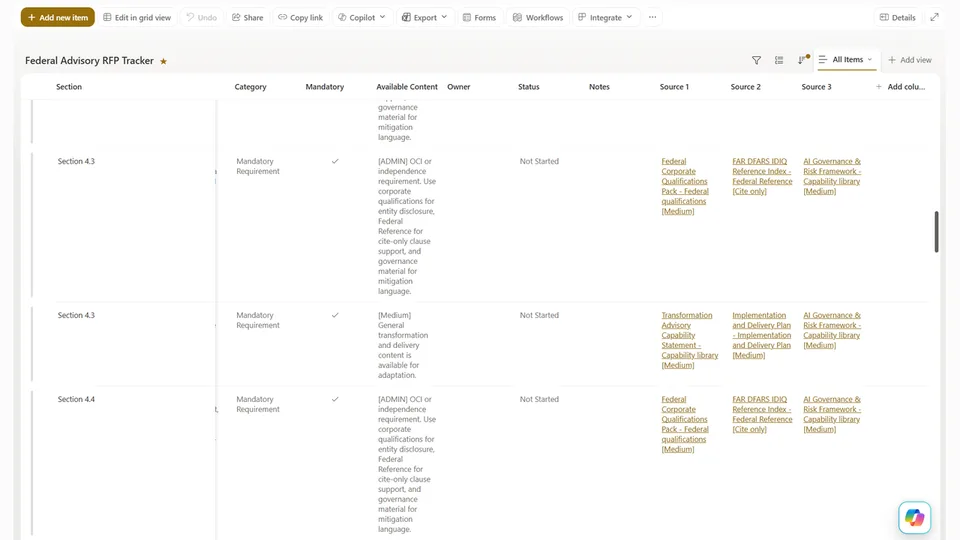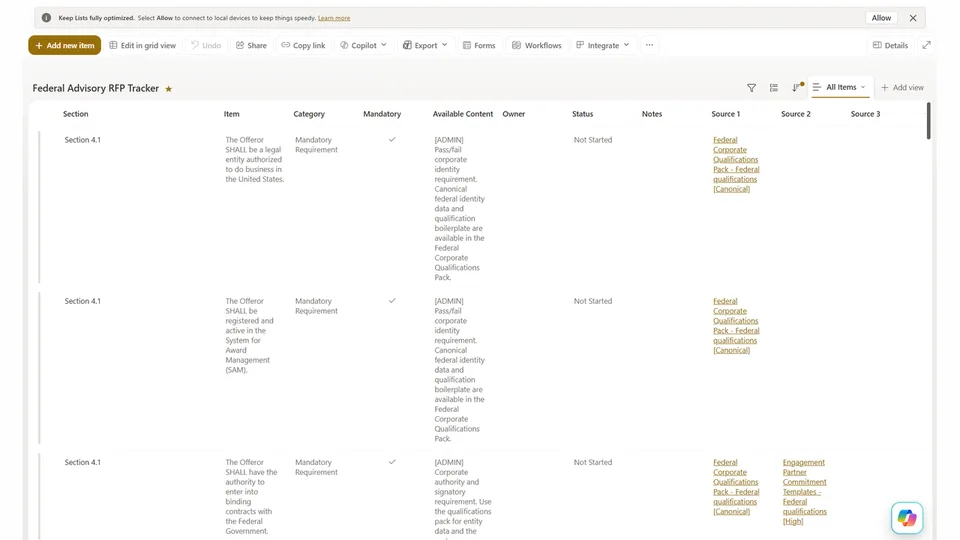
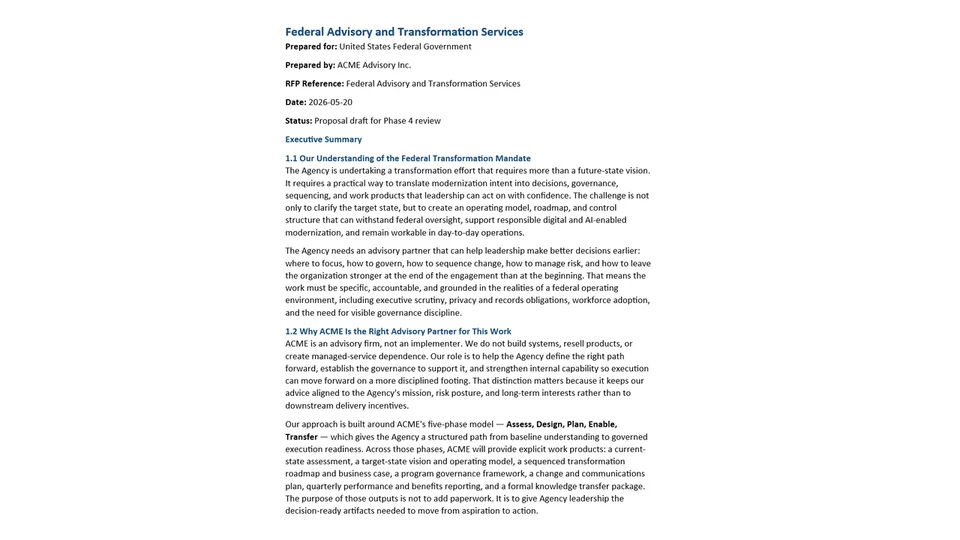
The RFP Response - Content Generation skill works section by section through the approved Table of Contents, reading the full source documents before writing any section. It tracks every mandatory RFP requirement in a per-section register and ensures each is explicitly answered in the prose.
Where source material does not exist, it inserts a structured, descriptive placeholder rather than fabricating content. The output is a complete Word document ready for Phase 4 review.
Drafts a complete proposal Word document section by section using the approved Strategy Brief as its blueprint, grounding every section in source documents before writing and inserting structured placeholders rather than inventing content where gaps exist.
What you get
- Complete proposal draft Word document (.docx) saved to the deal subfolder
- Every section drafted in Adapt, Synthesize, or Placeholder mode based on available source material
- Mandatory-requirement register tracked and answered per section
- Exceptions & Assumptions section included
- Page budget reconciliation — flags over- and under-developed sections
- Firm position boundary enforced — no invented proof points or client names
SharePoint Skill
| Solution | Author(s) |
|---|---|
| rfp-response-content-generation | Matt Wolodarsky | GitHub |
Version history
| Version | Date | Comments |
|---|---|---|
| 1.0 | June 2026 | Initial Release |
Disclaimer
THIS CODE IS PROVIDED AS IS WITHOUT WARRANTY OF ANY KIND, EITHER EXPRESS OR IMPLIED, INCLUDING ANY IMPLIED WARRANTIES OF FITNESS FOR A PARTICULAR PURPOSE, MERCHANTABILITY, OR NON-INFRINGEMENT.
Package
Ready to install
The ZIP contains only the upload-ready inner skill folder.
4e80f87b26c1962aca894dadd9459d0b1f10b202a6ef86426629dc6cf26d87a3View SKILL.md
---
name: rfp-response-content-generation
description: >
  Section-by-section proposal drafting agent. Takes the approved Strategy
  Brief (ToC + Content Strategy Brief), the RFP Tracker list, and the firm's
  source documents, and produces a complete proposal draft Word document.
  Drafts each section individually using one of three modes — Adapt,
  Synthesize, or Placeholder — based on available source material. Enforces
  the firm's position boundary throughout. Designed to run after Phase 2
  strategy approval and before Phase 4 review.
---

# Content Generation Skill

## Firm Profile (REQUIRED — fill in before use)

These values define who your firm is and how it writes. See `SETUP.md`.

- FIRM NAME:          [FIRM NAME]
- WHAT THE FIRM DOES: [one sentence]
- ROLE BOUNDARY:      [what the firm will NOT claim to do — leave blank if none]
- VENDOR STANCE:      [vendor-neutral OR resells/implements specific products]
- SPECIALIZATION:     [domains the firm credibly claims]
- VALUE MODEL:        [optional — the through-line your proposals argue]
- VOICE:              [3–5 adjectives]

---

## Purpose

This skill produces the proposal draft. It works section by section through the
approved Table of Contents, grounding each section in source material from the RFP
Tracker and capability library before writing. Every section has a specific source
basis, a specific drafting instruction from the Content Strategy Brief, and a
specific set of RFP requirements it must address. Where source material does not
exist, it inserts a structured placeholder rather than inventing content. The
output is a complete, structured Word document ready for Phase 4 review.

---

## Critical Output Rules

> **Do not output any draft content to chat.** The proposal draft is a document
> deliverable. All drafted content goes directly into the Word document saved in
> Step 7. Chat output is limited to one-line progress updates per section and the
> final summary. Never stream proposal content into chat.

---

## Firm Position Boundary

Internalise these constraints before drafting any section. They apply to every
word and cannot be overridden by source material or drafting instructions.

- **Respect the ROLE BOUNDARY.** If the firm advises but does not build/operate
  (or any similar boundary), match verbs to the role — "advise on", "design the
  approach for", "support your team to implement", not "build", "deploy",
  "operate". If the firm has no role boundary, skip this constraint.
- **Respect the VENDOR STANCE.** If vendor-neutral, never name, recommend, or imply
  preference for a specific product; if a client's RFP names a tool, acknowledge it
  neutrally. If the firm resells/implements products, position them as the Firm
  Profile allows.
- **Stay within SPECIALIZATION.** Do not claim expertise outside the firm's stated
  specialization unless source documents establish a credible track record.
- **Do not name clients without explicit permission.** Use anonymised descriptions
  ("a large public-sector organisation", "a national retailer").
- **Do not invent proof points.** If a statistic, outcome, or case study is not in
  the source documents, insert a placeholder — do not create a plausible-sounding version.

---

## Prerequisites

- The **Strategy Brief** (.docx, Phase 2) must be accessible — approved ToC, Coverage Map, strategic themes, tone/voice guidance, section-by-section drafting notes, and Page Budget Table (when present).
- The **RFP Tracker** List must be accessible with all columns populated: Category, Available Content, Source 1/2/3.
- All **source documents** in the Source columns must be accessible and readable in full.
- The **WIP Collaboration Folder** deal subfolder must exist with write access.

---

## Step 1 — Load the Strategy Brief

Read the Strategy Brief in full first. Extract and hold:
- **Approved Table of Contents** — exact structure, headings, order. The blueprint. Do not add/remove/reorder sections without explicit instruction.
- **Coverage Map** — which RFP Tracker rows map to which sections (what each section must address).
- **Strategic themes** — the 3–5 themes woven through the proposal, each tied to a client priority and firm differentiator.
- **Core value proposition** — the single overarching message; present in the exec summary and echoed throughout.
- **Tone and voice guidance** — language to use/avoid; appropriate register for this client.
- **Section-by-section drafting notes** — mandatory, not suggestions. Read every note before drafting its section.
- **Content gaps list** — requirements flagged in Phase 2 as having no source material; these require Placeholder mode regardless of what is found later.
- **Page Budget Table** — per-section page allocation. Hold each target as a hard ceiling and a soft floor (Step 5 check). If absent, note it and apply default proportions.
- **Competitive Positioning recommendation** — the lead lever (price / capability / delivery risk); shapes emphasis and word count.
- **Reference Gap Compensation moves** (if present) — named staff, analog engagement, partner reference, methodology overlay. Weave into the relevant sections, not appended as boilerplate.

---

## Step 2 — Load the RFP Tracker

Read the full list. For each row, note Category, the Available Content summary
(orientation only — do not draft from it), Source 1/2/3, and whether the row was
flagged a content gap ("No Match" → Placeholder mode).

Group rows by their mapped ToC section (using the Coverage Map). This gives the
source document list for each section before drafting.

### Build the Mandatory-Requirement Register

Extract every row marked Mandatory = Yes (or using *must*, *shall*, *required*) and
build a per-section register:
```
Section X — Mandatory Requirements to Answer
  • Bidder must provide a 90-day execution plan
  • Bidder must identify named key personnel
  • Response must address data handling and security
```
Every register item must be explicitly answered in the drafted section — it is the
section's compliance contract. If one cannot be answered from source material,
insert a placeholder that names it.

---

## Step 3 — Read Source Documents

Before drafting any section, follow the Source links in the RFP Tracker and read
the relevant documents in full.

> **Do not draft from the Available Content summaries.** They are 1–2 sentence
> excerpts for human triage — not sufficient for a credible, specific section. The
> full source documents contain the methodology detail, proof points, case study
> specifics, and language that make the draft substantive.

Read source documents grouped by section: identify which rows map to Section X,
collect all unique Source 1/2/3 documents across those rows, read each once and
extract relevant passages/proof points/language, and hold the extracts for drafting.
Do not start drafting a section until its source material has been read.

---

## Step 4 — Determine Drafting Mode Per Section

Determine which of three modes applies before drafting each section.

**Mode 1 — Adapt.** *Use when:* one or more source documents directly address the
section's requirements with high relevance. *How:* take the source content as the
structural/factual foundation; rewrite it to speak to this client's context, the
specific RFP question, and the section's strategic theme; apply tone and voice. The
result should feel written for this proposal, not copied from a previous one.

**Mode 2 — Synthesize.** *Use when:* no single source fully addresses the section,
but relevant material exists across multiple documents. *How:* identify the 2–4 most
relevant passages and construct an integrated response that draws on all without
repeating or contradicting — not a list of stitched excerpts. Apply the drafting
notes and tone/voice throughout.

**Mode 3 — Placeholder.** *Use when any of:*
- The row was flagged a content gap in Phase 2 (no source material exists)
- Source documents were read but contain no relevant material
- The requirement needs client/deal-specific info only the pursuit team or an SME can provide (pricing, key personnel CVs, signed certifications, proprietary timelines)
- Drafting would require inventing facts, statistics, or outcomes not in any source

*How to insert* — use this exact format in the correct location:
```
[PLACEHOLDER: {description of what is needed} — {who provides it} — {priority: High/Medium/Low}]
```
Examples:
```
[PLACEHOLDER: Two anonymised case studies demonstrating governance advisory in a healthcare context — Pursuit lead to source from past engagement records — Priority: High]
[PLACEHOLDER: Data residency and sovereignty controls approach — Technical SME input required — Priority: High]
[PLACEHOLDER: Key personnel CVs and role descriptions — HR / pursuit lead to provide — Priority: Medium]
```
The placeholder must be descriptive enough that the recipient knows exactly what to
write. `[TBD]` alone is a failure — always use the full descriptive format.

---

## Step 5 — Draft Each Section

Work through the approved ToC in order. For each section:

1. **Re-read the drafting notes** for this section before writing a word.
2. **Confirm which RFP Tracker rows** this section covers (Coverage Map).
3. **Pull the Mandatory-Requirement Register** — each item must be answered explicitly in the prose.
4. **Note the page-count target** from the Page Budget Table.
5. **Apply the correct drafting mode** based on the source material read in Step 3.
6. **Write the section** following the drafting notes, applying tone/voice, ensuring every mapped RFP row is addressed.
7. **Check the Firm Position Boundary** before moving on.

### Page-Count Target Check (per section)
- **Within ±10% of target:** acceptable.
- **Over target:** flag for trimming in Step 6 — do not silently truncate.
- **More than 20% under target:** flag as **under-developed** (usually a mandatory requirement answered thinly or a theme not fully argued). Note in the progress log and revisit before Step 6.

If no Page Budget Table is present, apply a default proportion (exec summary 5–8%,
remaining sections proportional to evaluation weight) and use the same thresholds.

### Staffing / Key Personnel Section Guidance
Include what the RFP asks for. A strong staffing section typically covers:
1. **Team structure** — who is on the team and how they relate (org chart or clear narrative of reporting lines). Insert a placeholder if a chart asset is needed:
   ```
   [PLACEHOLDER: Organisation chart for proposed engagement team — Graphics / pursuit lead — Priority: High]
   ```
2. **Named key personnel** — each key role named with title, engagement role, and short bio. Use placeholders for unconfirmed names.
3. **Time commitment** — where the RFP asks, the proportion of each named person's time. Avoid vague phrasing ("significant time", "as required") when a specific commitment is expected.
4. **Continuity / succession** — where relevant, how continuity is maintained if a key person becomes unavailable.

Adapt depth to the RFP. If source material does not cover a required sub-element,
insert a structured placeholder — do not omit it.

### Section-Level Quality Checks (before moving on)
- Does the section address all RFP rows mapped to it?
- Is every Mandatory-Requirement Register item answered in the prose?
- Is page length within range (±10% acceptable, >20% under flagged)?
- Is the relevant strategic theme present and argued — not just mentioned?
- Does the writing match the tone guidance (specific, confident, outcome-focused)?
- Are all unsourced claims removed or replaced with a placeholder?
- If a placeholder is present, does it follow the correct format and describe what is needed?

### Executive Summary — Special Instructions
Draft last, after all body sections. It should:
- Open with the firm's understanding of the client's situation (from RFP and Win Strategy Brief — not generic)
- State the core value proposition in the first or second paragraph
- Reference the primary strategic themes — introduce no new ones
- Close with a clear "why [FIRM NAME]", tied to the highest-weighted evaluation criteria
- Be no longer than one page

### Exceptions & Assumptions Section — Recommended
Every draft should include an **Exceptions & Assumptions** section near the end of
the body (immediately before appendices). Including it even when empty reassures the
evaluator.
```
Exceptions & Assumptions

Exceptions to the RFP:
  [List each exception with the RFP clause/section it modifies and the proposed
   alternative. If none, write exactly: "[FIRM NAME] takes no exceptions to the
   terms, conditions, or requirements of this solicitation."]

Assumptions:
  [List each material assumption (e.g., availability of client-furnished information,
   access to named stakeholders, timelines). If none material, write exactly:
   "[FIRM NAME]'s proposal is based on the requirements as stated in the solicitation.
   No additional assumptions have been taken."]
```
Do not bury exceptions inside body sections — a buried exception is a scoring risk.

### Appendices
For each required appendix in the Coverage Map:
- If source material exists (capability statements, past case studies): draft a concise appendix in Adapt or Synthesize mode.
- If not (signed certifications, pricing workbook, key personnel CVs): insert a placeholder appendix with a cover heading and a single descriptive placeholder block.

---

## Step 6 — Internal Consistency Check

Before writing the Word document, run across all drafted sections:

1. **Theme continuity** — do the same 3–5 themes appear across multiple sections? Each win theme should be present in at least two body sections.
2. **Contradictions** — any section claim that contradicts another (different timelines, team sizes, conflicting methodology descriptions)?
3. **Placeholder completeness** — all placeholders in correct format? Any sections that should have placeholders missing them?
4. **Tone consistency** — does the voice shift noticeably between sections? Smooth jarring transitions.
5. **Mandatory-requirement sweep** — every mandatory requirement from Step 2 answered at least once in the drafted prose. List any unanswered; draft a response or insert a named placeholder before proceeding.
6. **Page budget reconciliation** — sum drafted page lengths against the Page Budget Table. Flag over-target sections for trimming and >20%-under sections as under-developed. Document the variance in the summary.
7. **Recommended section presence** — confirm Exceptions & Assumptions is present (substantive or "none taken" default).

Fix any issues before Step 7.

---

## Step 7 — Save the Proposal Draft

1. **Locate the deal subfolder** in the WIP Collaboration Folder (naming: `[ClientShortName]_[RFPShortName]_[Year]`).
2. **Create the Word document** with:
   - Cover page: proposal title, client name, RFP reference, date, prepared by [FIRM NAME]
   - Auto-generated table of contents from document headings
   - Body sections in approved ToC order, each with a clear Heading 1 or Heading 2
   - **Exceptions & Assumptions** immediately before appendices
   - Appendices following the body, each starting on a new page with a clear heading
   - Placeholders visually distinct (square brackets) so they are obvious to a reviewer
   - File name: **[ClientName]_Proposal_Draft_v1_[Date].docx**
3. **Save** to the deal subfolder.
4. If the interface does not support direct Word creation/upload to SharePoint, create the document in the workspace and provide the user a download link with instructions to upload it manually.
5. **Report back** with a concise summary only (below). Do not reproduce proposal content in chat.

### Example Summary Output

```
Content Generation complete.

Sections drafted: 9 body sections + Exceptions & Assumptions + 4 appendices

Drafting mode breakdown:
  Adapt:        5 sections (strong source material available)
  Synthesize:   3 sections (material drawn from 2–3 sources each)
  Placeholder:  1 section + 2 appendices (content gaps or SME input needed)

Strategic themes coverage:
  Governance-First Transformation — Sections 1, 2, 3
  Vendor-Neutral Independence     — Sections 1, 4
  Knowledge Transfer              — Sections 1, 5
  90-Day Execution Readiness      — Section 3 only
                                    (consider echoing in executive summary)

Mandatory-requirement traceability:
  Answered inline:     27 / 28
  Unanswered flagged:  1 — placeholder inserted for named key personnel

Page budget reconciliation (target vs. drafted):
  On target (±10%):       7 sections
  Over target:            1 section (Section 4, ~12% over — trim recommended)
  Under-developed (>20%): 1 section (Section 6, ~28% under — revisit before Phase 4)

Placeholders inserted: 7
  • Section 5.1 — Programme Lead name/bio (pursuit lead — High)
  • Section 5   — Org chart graphic (graphics — High)
  • Section 6.1 — Subcontracting strategy (pursuit lead — High)
  • Appendix C  — Signed certifications (contracts team — High)
  • Appendix D  — Pricing workbook (salesperson — High)
  • Section 2.3 — Data residency controls (technical SME — High)
  • Appendix A  — Key personnel CVs (HR — Medium)

Firm position boundary: No violations detected

Proposal draft saved to:
   WIP Collaboration Folder / Northwind_TransformationRFP_2026 /
   Northwind_Proposal_Draft_v1_2026-03-04.docx

Next step: Run Phase 4 Review skill against this draft before human review.
```

---

## Notes & Edge Cases

- **RFP requires a specific response format or sequence:** Follow the RFP's numbered structure for section headings, but apply strategic themes and drafting notes within each section. Do not sacrifice compliance for narrative elegance.
- **Source documents are very long:** Use the Available Content summary as a navigation guide to locate the relevant passage, then read that passage in full. Do not read every word of a 50-page document for every section.
- **Source documents contradict each other:** Use the most recent document as authoritative. Note the discrepancy in the summary — do not silently resolve it in the draft.
- **The drafting notes are ambiguous:** If a note says "emphasise our methodology" but source material is thin, default to Synthesize or Placeholder mode rather than generalising. Vague methodology claims score poorly.
- **Multiple rows map to a single section:** Address all mapped rows in a coherent flow — not a separate paragraph per row.
- **A row maps to multiple sections:** Note this with a cross-reference (e.g., "See also Appendix B for detailed case studies").
- **Draft is running very long:** Check the Submission Checklist from Phase 2 for any page limit. If one applies, note it and flag which sections may need trimming — do not silently truncate.
- **Win/Loss Debrief flagged a structural lesson not in the approved ToC:** Flag to the user in the summary — do not add/change sections without human approval of the ToC.
- **No Page Budget Table:** Apply default proportions (exec summary 5–8%, body sections proportional to evaluation weight) and note in the summary that allocation was inferred.
- **Staffing section with no named personnel confirmed:** Draft the structural elements (team structure, commitments, continuity) using role labels and insert named placeholders for every personnel slot. Do not omit the section.
References
- agentskills.io specification
The specification that SharePoint AI skills follow for installation and discovery.
Discuss this skill
Ask a question, share how you used it, or suggest an improvement with the community.
Open GitHub Discussions