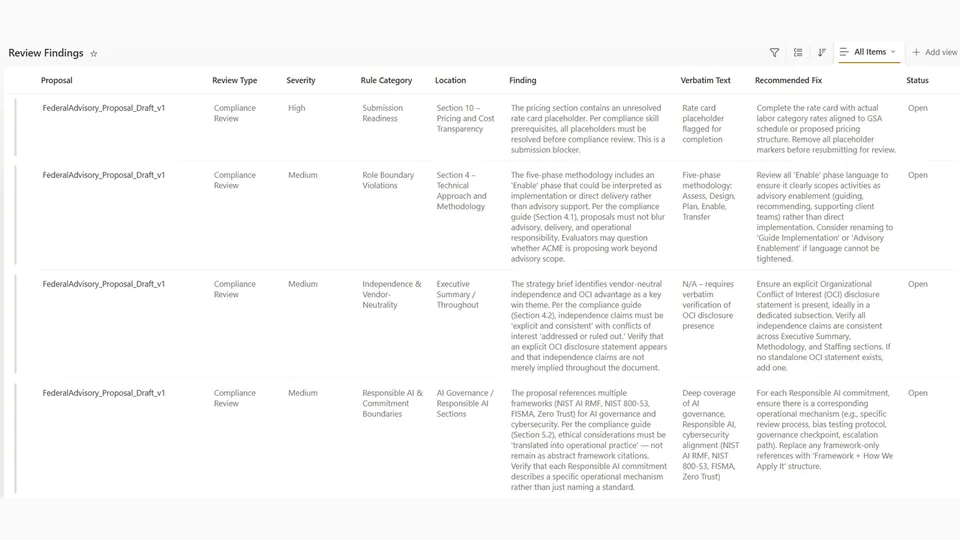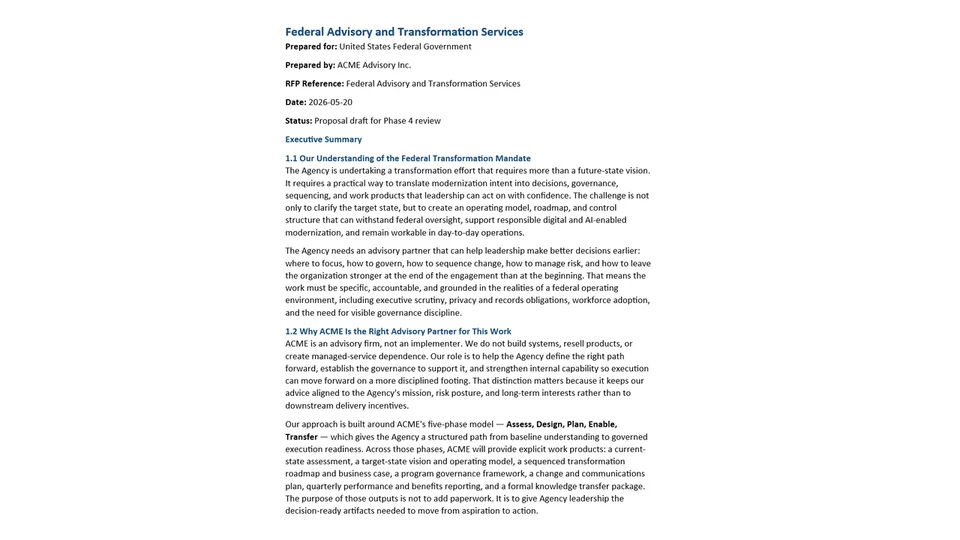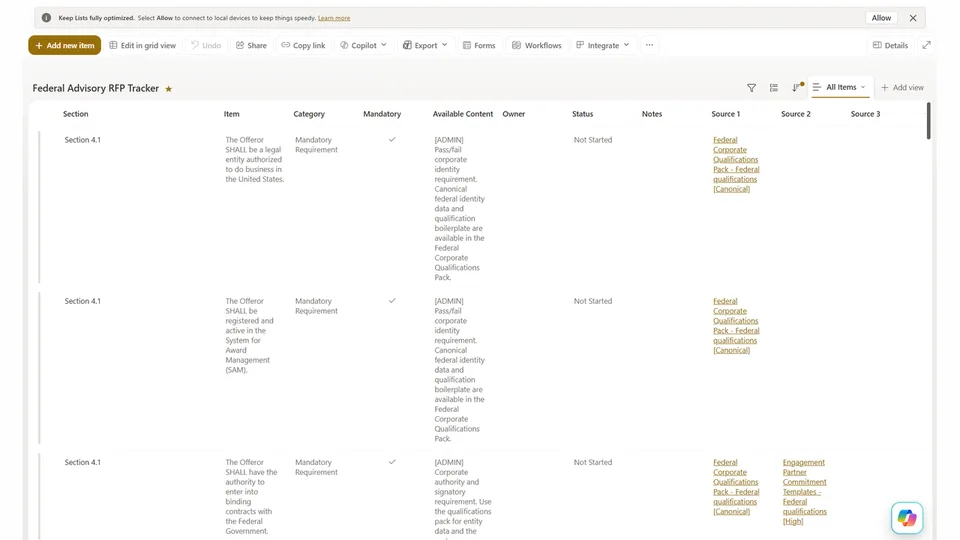
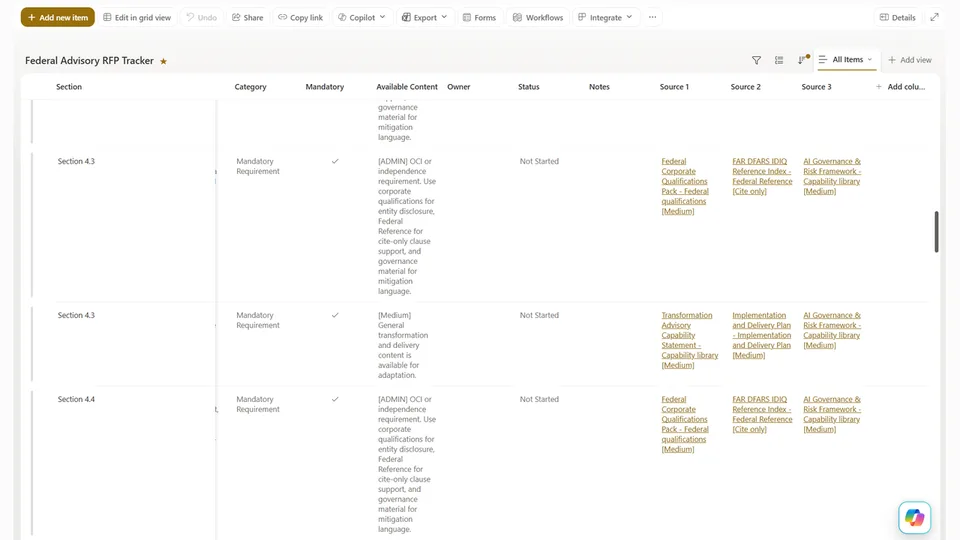
The RFP Response - Content Finder skill classifies each RFP Tracker row as administrative or substantive, routes substantive rows to the most relevant content libraries, scores and ranks document matches, and writes results back to the tracker.
The Source hyperlink columns it populates are the input the Content Generation skill uses in Phase 3 — it follows these links to read the full source documents before drafting each proposal section.
Searches the firm's SharePoint content libraries to find existing material matching each row in the RFP Tracker, then writes availability summaries and clickable source links back to the tracker for human review and Phase 3 drafting.
What you get
- Available Content column populated with plain-language summaries for every tracker row
- Source 1, 2, 3 hyperlink columns populated with ranked document links
- Administrative rows classified and routed to corporate boilerplate
- No Match rows flagged — require SME or salesperson input before drafting
- Library hit distribution report — surfaces gaps in the firm's content estate
SharePoint Skill
| Solution | Author(s) |
|---|---|
| rfp-response-content-finder | Matt Wolodarsky | GitHub |
Version history
| Version | Date | Comments |
|---|---|---|
| 1.0 | June 2026 | Initial Release |
Disclaimer
THIS CODE IS PROVIDED AS IS WITHOUT WARRANTY OF ANY KIND, EITHER EXPRESS OR IMPLIED, INCLUDING ANY IMPLIED WARRANTIES OF FITNESS FOR A PARTICULAR PURPOSE, MERCHANTABILITY, OR NON-INFRINGEMENT.
Package
Ready to install
The ZIP contains only the upload-ready inner skill folder.
e33112d2ecd4c60154c9bc332d38878642b7d95c866ae94094f15e61c34dae75View SKILL.md
---
name: rfp-response-content-finder
description: >
  Searches the firm's SharePoint document libraries — Capability Library,
  Content Asset Library, Past Proposals Library, and Standard Positions — to
  find existing content that matches each requirement or question in the RFP
  Tracker list. Classifies each row as administrative or substantive before
  searching, with smart routing per library. Writes concise summaries into
  Available Content and document URLs into three dedicated SharePoint Hyperlink
  columns (Source 1, Source 2, Source 3) for clickable navigation.
---

# Content Finder Skill

## Firm Profile (REQUIRED — fill in before use)

These values define who your firm is and how it writes. See `SETUP.md`.

- FIRM NAME:          [FIRM NAME]
- WHAT THE FIRM DOES: [one sentence]
- ROLE BOUNDARY:      [what the firm will NOT claim to do — leave blank if none]
- VENDOR STANCE:      [vendor-neutral OR resells/implements specific products]
- SPECIALIZATION:     [domains the firm credibly claims]
- VOICE:              [3–5 adjectives]

---

## Purpose

For each row in the RFP Tracker, classify it, route it to the most relevant
content libraries, and populate four columns: **Available Content** (a short
plain-language summary for human review in list view) and up to three **Source**
hyperlink columns pointing to the matched documents.

> **Source links are the drafting input for Phase 3.** The Content Generation
> agent follows them to retrieve and read the full documents before drafting.
> The Available Content summary is for human review only — it is not sufficient
> for drafting.

---

## Prerequisites

- The **RFP Tracker** List must be populated (output of RFP Extraction).
- The list must have these columns configured:
  - **Available Content** — Multiple lines of text
  - **Source 1**, **Source 2**, **Source 3** — Hyperlink type (each stores one
    URL with display text)
- Read access to the firm's content libraries:
  - **Capability Library** — methodology, capability statements, case-study abstracts
  - **Content Asset Library** — slides, FAQs, proposal fragments, boilerplate
  - **Past Proposals Library** — prior submitted proposals
  - **Standard Positions** — reusable positions on IP & data rights, pricing, exceptions & assumptions
- Write access to the RFP Tracker list to update all four columns.

> Library names above are the `SETUP.md` defaults. If you renamed them, use your
> names consistently here and in the routing map.

---

## Step 1 — Load the RFP Tracker List

1. Retrieve all items from the RFP Tracker list.
2. For each item, read **Item**, **Category**, **Mandatory**, and the four output
   columns — skip rows where all four are already populated unless the user
   requests a full re-run.
3. Build a working queue. Place **Mandatory = Yes** rows at the front.

---

## Step 2 — Pre-screen: Classify Each Row

Classify every queued row as **Administrative** or **Substantive** before
searching — this determines whether a library search is needed and which libraries.

### Administrative Requirements

Pass/fail legal, corporate, or regulatory qualifiers. The correct response is a
legal attestation, standard corporate certification, or a direct lift of identity
data — not a content match from the methodology libraries.

**Indicators:** legal authority to bind the firm; corporate registration, entity
status, jurisdiction, tax IDs; financial stability, bonding, insurance;
conflict-of-interest/independence; signatory authority/notarization; diversity/
socioeconomic certifications.

**Action:** no methodology-library match needed. Write a standard attestation note
pointing to where the corporate/legal data lives and, where appropriate, the team
that confirms response language.
```
Available Content: [ADMINISTRATIVE QUALIFIER] Pass/fail legal or corporate
eligibility requirement. Respond with standard corporate certification,
attestation, or legal declaration. Identity/boilerplate data — if needed —
comes from the firm's corporate boilerplate document.

Source 1: [Display: Corporate Boilerplate — Content Asset Library]
          [URL: link to the firm's corporate boilerplate document]
Source 2: [Display: Legal/Contracts team — confirm response language]
          [URL: leave blank or link to internal template if available]
Source 3: [leave blank]
```

### Substantive Requirements

All other rows — approach, methodology, team, references, pricing, governance,
change management, IP/data rights, exceptions, technical capability. Apply Steps
3 and 4.

---

## Step 3 — Route, Then Index the Document Libraries

For substantive rows only. **Route first, then index** — searching every library
for every row wastes budget and dilutes relevance.

### Library Routing Map

| Requirement signal (keywords / topic) | Primary library | Secondary libraries |
|---|---|---|
| References, prior similar engagements, case studies | **Past Proposals Library** | Capability Library |
| Methodology, approach, framework, "how do you…" | **Capability Library** | Content Asset Library, Past Proposals |
| Team, bios, roles, staffing | **Capability Library** | Past Proposals |
| IP, data rights, deliverables ownership | **Standard Positions** (IP & Data Rights) | Capability Library |
| Pricing model, rate card, fee structure | **Standard Positions** (Pricing) | Past Proposals |
| Exceptions, assumptions, deviations from terms | **Standard Positions** (Exceptions) | Capability Library |
| Change management, adoption, training | Capability Library | Past Proposals |
| Subcontracting, teaming, partnership strategy | Past Proposals | Capability Library |
| Anything not above | Capability Library | Content Asset Library, Past Proposals |

> Adapt the topic rows to your firm's actual `SPECIALIZATION`. The routing
> structure matters more than the specific keywords.

### Indexing

For each routed library:
1. Retrieve documents.
2. Extract: title, filename, library, full text (or, for long documents, key
   sections — executive summary, approach, methodology, differentiators, team profiles).
3. Log any documents that cannot be read (scanned, protected, corrupt) and
   continue — do not halt.

> If a routed library has 50+ documents and the requirement is broad, ask the
> user to confirm the RFP's primary solution domain so results can be pre-filtered
> by metadata tags before scoring.

---

## Step 4 — Score and Rank Content

For each substantive row, score documents from the routed libraries.

### Relevance Scoring Criteria

| Signal | Weight | Description |
|---|---|---|
| **Semantic alignment** | High | Addresses the same topic/question, even if phrased differently |
| **Keyword overlap** | High | Core nouns/phrases from the requirement appear in the document |
| **Category match** | Medium | Capability statements score higher for approach questions; Past Proposals for examples/references; Standard Positions for IP/pricing/exceptions |
| **Library source** | Medium | Preference order: **Capability Library → Past Proposals → Standard Positions → Content Asset Library**. Higher-authority libraries win ties. |
| **Recency** | Low | More recently modified documents score slightly higher |

### Ranking Rules

- Return the **top 3 matches** per row. Fewer is acceptable — never pad with
  weakly relevant documents.
- Only include a match with genuine, meaningful relevance to the specific requirement.
- If no document clears a meaningful relevance threshold, flag the row as **No
  Match Found** rather than inserting a low-quality result.

---

## Step 5 — Populate the Columns

For each row — administrative or substantive — write all four columns.

### Available Content Column

**Max 2 sentences and 50 words** per match (this column is read in list view). Do
not include document names or URLs here; those go in the Source columns.

**Substantive matches:**
```
[High] Five-step delivery methodology with risk tiering directly applicable to
this requirement — approach section adaptable with minimal editing.
[Medium] Prior engagement with comparable scope and outcomes. [Medium] Standard
IP & data rights position — deliverables licensing language ready to lift.
```
**No match:**
```
[NO MATCH] No existing content found. Net-new content required —
see Source 1 for recommended next action.
```
**Administrative rows:**
```
[ADMIN] Pass/fail corporate eligibility requirement. Boilerplate data available
in the corporate boilerplate document; legal language confirmed by Contracts.
```

### Source 1, Source 2, Source 3 Columns (Hyperlink type)

One document URL per column, in relevance order. Set display text to include
title, library, and relevance level so reviewers see meaningful labels.

**Display text format:** `Document Title — Library [Relevance]`

**Example (substantive, methodology question):**
```
Source 1: Display: "Delivery Methodology Framework — Capability Library [High]"
          URL: https://contoso.sharepoint.com/sites/Proposals/CapabilityLibrary/Delivery_Methodology_Framework.docx
Source 2: Display: "Comparable Engagement Summary — Past Proposals Library [Medium]"
          URL: https://contoso.sharepoint.com/sites/Proposals/PastProposalsLibrary/Comparable_Engagement_Summary.docx
Source 3: Display: "IP & Data Rights Position — Standard Positions [Medium]"
          URL: https://contoso.sharepoint.com/sites/Proposals/StandardPositions/IP_and_Data_Rights_Position.docx
```
**Example (administrative, identity data):**
```
Source 1: Display: "Corporate Boilerplate — Content Asset Library [Canonical]"
          URL: https://contoso.sharepoint.com/sites/Proposals/ContentAssetLibrary/Corporate_Boilerplate.docx
```
**If fewer than 3 matches exist:** leave unused Source columns blank.

**If no match:** write a recommended action in Source 1 with no URL:
```
Source 1: Display: "NO MATCH — Escalate to SME: [describe topic needed]"
          URL: [leave blank]
```

---

## Step 6 — Report Back to the User

Provide a summary with:

- Total rows processed, split by Administrative vs Substantive.
- Substantive rows with matches vs. No Match Found.
- No Match rows (row number + item text) — require SME/salesperson input before Phase 3.
- Library hit distribution (rows per library) — surfaces gaps in the content estate.
- Documents that could not be indexed (filenames + reason).
- Confirmation that Available Content and Source 1/2/3 are updated.

### Example Summary Output

```
Content mapping complete — RFP Tracker updated.

Rows processed: 31
  • Administrative qualifiers:     6
  • Substantive rows matched:     19
  • Substantive rows — No Match:   6

Library hit distribution (substantive):
  • Capability Library:           9
  • Past Proposals Library:       6
  • Standard Positions:           3
  • Content Asset Library:        1

No Match rows requiring net-new content or SME input:
  Row 9  — "Provide 2 examples of similar engagements in a healthcare context"
  Row 14 — "Explain your subcontracting and teaming strategy"
  Row 19 — "Detail your data residency and sovereignty controls"
  Row 22 — "Describe your exit and transition methodology"
  Row 26 — "Provide your proposed rate card and pricing model"
  Row 30 — "Describe your approach to continuous improvement"

2 documents could not be indexed (access restricted):
  - FAQs_Legacy_v1.pdf
  - CaseStudy_Redacted.pptx

Next steps: Review Available Content summaries in list view. Click Source links
to verify assets before approving mappings at the Phase 1 gate. Plan SME input
for the 6 unmatched substantive rows before Phase 3 drafting begins.
```

---

## Notes & Edge Cases

- **Administrative vs substantive edge cases:** If a row is ambiguous (e.g.,
  "Describe your firm's legal structure and authority to perform this work"),
  classify it as substantive — it needs both a legal attestation AND a descriptive
  response. Flag both components in Available Content.
- **Duplicate content across libraries:** List the document once in the
  highest-authority library (per Step 4 preference order) and note both locations
  in the display text.
- **Long documents:** For past proposals over 20 pages, reference the specific
  section in the Source display text (e.g., "Past Proposals Library —
  Modernization Engagement (pp. 4–7) [High]") so the Content Generation agent
  knows where to read.
- **Restricted documents:** If a document is confidential/under NDA, note the
  restriction in the Source display text rather than omitting the match — the
  human reviewer decides whether to approve it for reuse.
- **Re-running:** On re-run, only process rows where Available Content is blank or
  contains a NO MATCH flag. Do not overwrite approved mappings unless the user
  explicitly requests a full reset.
- **Mandatory rows:** Process Mandatory = Yes rows first. If any mandatory
  substantive row returns No Match, flag it prominently — these are the highest
  proposal-risk items.
References
- agentskills.io specification
The specification that SharePoint AI skills follow for installation and discovery.
Discuss this skill
Ask a question, share how you used it, or suggest an improvement with the community.
Open GitHub Discussions