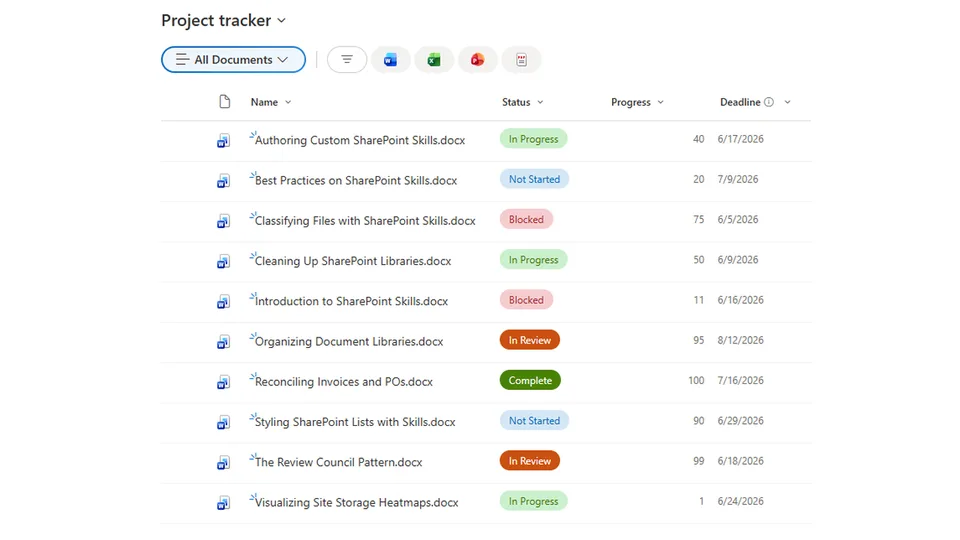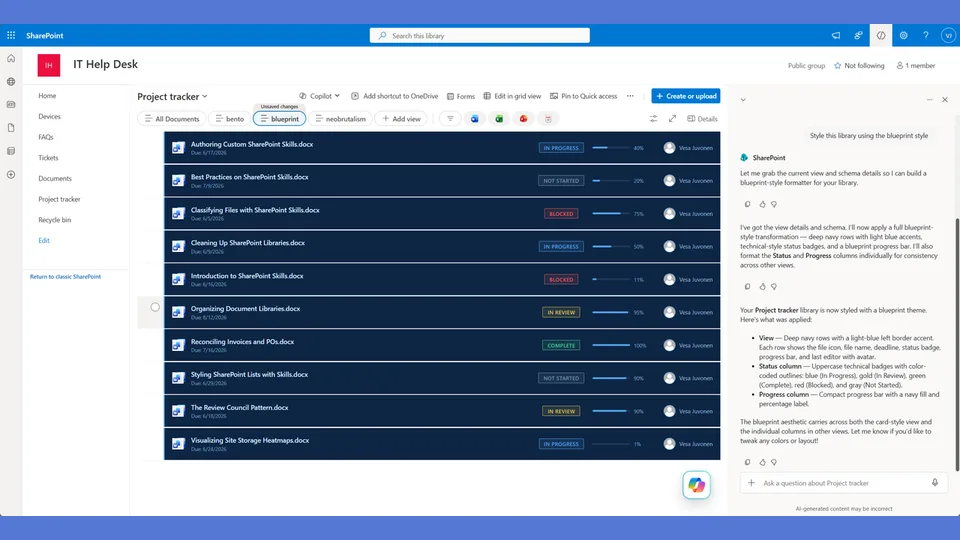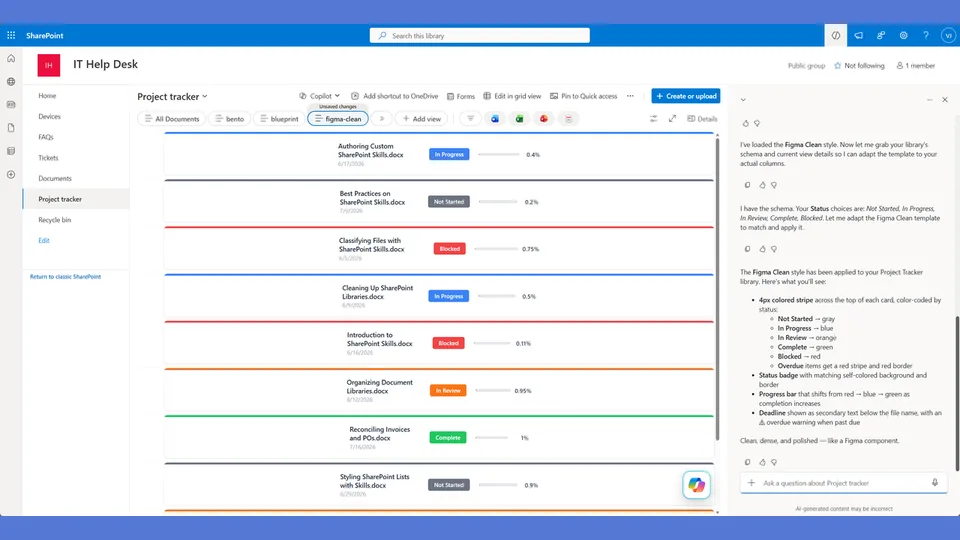
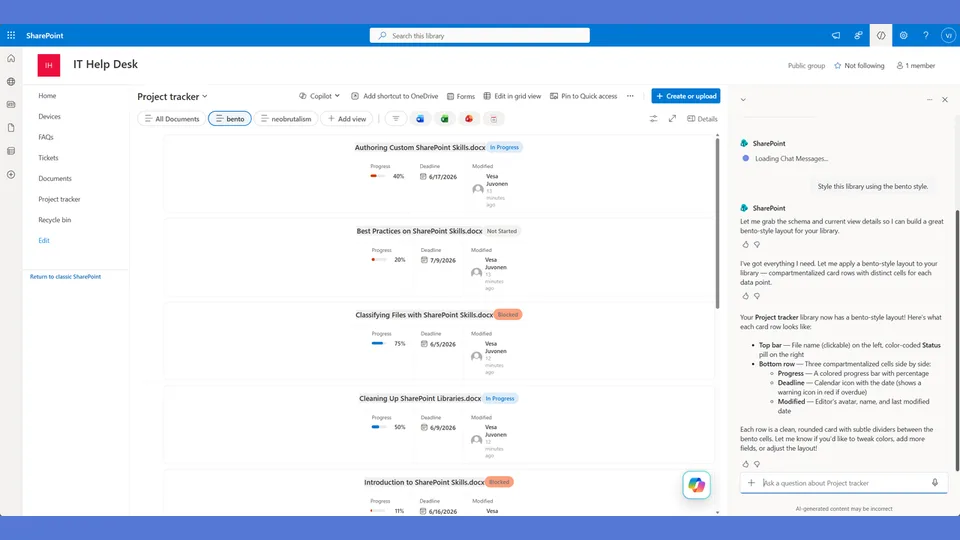
Bento style tokens for the list-styling skill. Each row becomes a horizontal card divided into labeled compartments (Document, Status, Progress, Deadline) with visible dividers between sections.
Warm earth tones with subtle shadows — organized without being loud. Use when the user says 'bento,' 'warm style,' 'earth tones,' or 'muted colors.'
A SharePoint list style inspired by bento boxes — each row is a horizontal card divided into labeled compartments (Document, Status, Progress, Deadline) with visible dividers between sections. Warm earth tones, subtle shadows, organized without being loud.
What you get
- Design tokens for warm-toned status badges (burnt orange, olive green, slate)
- A horizontal compartment
rowFormatterwhere each section has a tiny uppercase label above its content - Progress percentage displayed large (20px) and centered in its compartment
- Overdue items get a red left-border accent — subtle, not aggressive
Using this style
This is a style token skill — it provides design tokens and a reference rowFormatter, but does not apply them on its own. Pair it with the list-styling skill, which reads the tokens from this skill and adapts the row template to your library's actual columns.
Typical flow:
- Install both this skill and list-styling into your SharePoint Skills library.
- From a Copilot agent, ask: "Style this library using the bento style."
Looking for sample content to try it on? The list-styling demo ships with ten short Word documents and the exact Status, Progress, and Deadline column setup the row template expects.
When to use this style
Audience: ops teams, project managers, and content owners who need clear sectioning between metadata fields without flashy treatment. Tone: organized, warm, earth-toned, considered — not loud.
Demo video
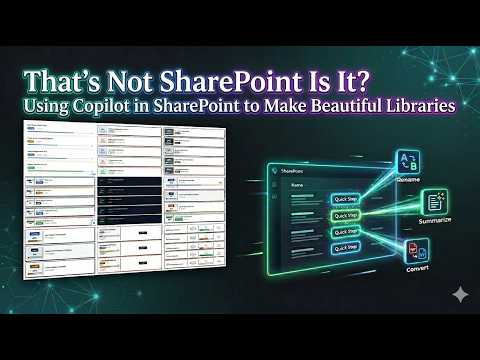
SharePoint Skill
| Solution | Author(s) |
|---|---|
| style-bento | Zach Rosenfield | GitHub | LinkedIn |
Version history
| Version | Date | Comments |
|---|---|---|
| 1.0 | May 2026 | Initial Release |
Disclaimer
THIS CODE IS PROVIDED AS IS WITHOUT WARRANTY OF ANY KIND, EITHER EXPRESS OR IMPLIED, INCLUDING ANY IMPLIED WARRANTIES OF FITNESS FOR A PARTICULAR PURPOSE, MERCHANTABILITY, OR NON-INFRINGEMENT.
Package
Ready to install
The ZIP contains only the upload-ready inner skill folder.
View SKILL.md
---
name: style-bento
description: Bento style tokens and row template for the list-styling skill. Card layout inspired by bento boxes — distinct compartments separated by thin borders, each section labeled, warm earth tones. Layout is a horizontal row of compartments (name | status | progress | deadline) with visible dividers between each. Use when the user says "bento," "compartment," "warm style," "earth tones," "organized," or similar.
---

# Bento — Style Tokens + Row Template

Warm, organized, compartmentalized. Each row is a card divided into labeled compartments like a bento box — visible dividers, each section has a header label above its content.

**Layout philosophy: Horizontal compartments with dividers.** Not a sidebar split, not a single stack. Four distinct compartments in a row: Name | Status | Progress | Deadline. Each compartment has a tiny uppercase label above the content. The dividers between compartments ARE the design.

## Badge Tokens

- padding: `4px 10px`
- border-radius: `4px`
- font-size: `11px`
- font-weight: `600`
- text-transform: `uppercase`

### status_colors

| Value | bg | text | border |
|---|---|---|---|
| Draft | `#9ca3af` | `#ffffff` | `0px` |
| In Review | `#3b82f6` | `#ffffff` | `0px` |
| Revising | `#ea580c` | `#ffffff` | `0px` |
| Approved | `#16a34a` | `#ffffff` | `0px` |
| Published | `#15803d` | `#ffffff` | `0px` |
| _fallback | `#d1d5db` | `#ffffff` | `0px` |

## Progress Bar Tokens

- progress_track_height: `8px`
- progress_track_bg: `#f3f4f6`
- progress_track_border: `0px`
- progress_track_radius: `4px`
- progress_fill_radius: `4px`
- progress_color_low: `#ef4444`
- progress_color_mid: `#ea580c`
- progress_color_high: `#22c55e`
- progress_label_font_size: `20px`
- progress_label_font_weight: `700`
- progress_label_color: `#1f2937`

## Row Card Tokens

- card_border: `1px solid #e5e7eb`
- card_border_radius: `8px`
- card_background: `#ffffff`
- card_margin_bottom: `8px`
- card_shadow: `0px 1px 3px #0000000d`
- compartment_border: `1px solid #e5e7eb` (dividers between sections)
- compartment_label_color: `#9ca3af`
- compartment_label_size: `9px`
- compartment_label_weight: `600`
- compartment_label_transform: `uppercase`
- compartment_label_spacing: `0.5px`
- overdue_accent: `2px solid #dc2626` (left border accent on overdue cards)

---

## Row Template Layout

Horizontal compartment grid. Each section is a labeled box.

```
┌──────────────────┬───────────┬──────────────────┬──────────────┐
│ DOCUMENT         │ STATUS    │ PROGRESS         │ DEADLINE     │
│                  │           │                  │              │
│ API Guide.docx   │ [In Rev]  │        72%       │ 📅 5/15/2026 │
│                  │           │ ████████████░░░  │ DEADLINE     │
│                  │ On Track  │                  │              │
└──────────────────┴───────────┴──────────────────┴──────────────┘
  ↑ overdue cards get a 2px red left border accent
```

## rowFormatter JSON

**Adapt before applying.** The column names below (`[$Status]`, `[$Progress]`, `[$Deadline]`) are example placeholders — replace them with the actual internal column names from the user's list. Also update every status value string ('Draft', 'In Review', 'Revising', etc.) to match the user's actual Choice values. Follow list-styling Step 3.

```json
{
  "$schema": "https://developer.microsoft.com/json-schemas/sp/v2/view-formatting.schema.json",
  "hideSelection": false,
  "hideColumnHeaders": true,
  "rowFormatter": {
    "elmType": "div",
    "style": {
      "display": "flex",
      "border": "1px solid #e5e7eb",
      "border-left": "=if([$Deadline] < @now, '3px solid #dc2626', '1px solid #e5e7eb')",
      "border-radius": "8px",
      "background-color": "#ffffff",
      "margin-bottom": "8px",
      "box-shadow": "0px 1px 3px #0000000d",
      "overflow": "hidden",
      "min-height": "90px"
    },
    "children": [
      {
        "elmType": "div",
        "style": {
          "flex": "2",
          "padding": "14px 16px",
          "display": "flex",
          "flex-direction": "column",
          "gap": "6px",
          "border-right": "1px solid #e5e7eb"
        },
        "children": [
          {
            "elmType": "span",
            "txtContent": "DOCUMENT",
            "style": {
              "font-size": "9px",
              "font-weight": "600",
              "color": "#9ca3af",
              "text-transform": "uppercase",
              "letter-spacing": "0.5px"
            }
          },
          {
            "elmType": "div",
            "style": {
              "font-size": "14px",
              "font-weight": "700",
              "color": "#1f2937",
              "line-height": "1.3"
            },
            "txtContent": "=if([$FileLeafRef] == '', [$Title], [$FileLeafRef])"
          }
        ]
      },
      {
        "elmType": "div",
        "style": {
          "flex": "1",
          "padding": "14px 16px",
          "display": "flex",
          "flex-direction": "column",
          "gap": "8px",
          "align-items": "center",
          "justify-content": "center",
          "border-right": "1px solid #e5e7eb"
        },
        "children": [
          {
            "elmType": "span",
            "txtContent": "STATUS",
            "style": {
              "font-size": "9px",
              "font-weight": "600",
              "color": "#9ca3af",
              "text-transform": "uppercase",
              "letter-spacing": "0.5px"
            }
          },
          {
            "elmType": "span",
            "txtContent": "[$Status]",
            "style": {
              "display": "inline-block",
              "padding": "4px 10px",
              "border-radius": "4px",
              "font-size": "11px",
              "font-weight": "600",
              "text-transform": "uppercase",
              "white-space": "nowrap",
              "color": "#ffffff",
              "background-color": "=if([$Status] == 'Draft', '#9ca3af', if([$Status] == 'In Review', '#3b82f6', if([$Status] == 'Revising', '#ea580c', if([$Status] == 'Approved', '#16a34a', if([$Status] == 'Published', '#15803d', '#d1d5db')))))"
            }
          },
          {
            "elmType": "span",
            "txtContent": "=if([$Deadline] < @now, '⚠ At Risk', '✓ On Track')",
            "style": {
              "font-size": "10px",
              "font-weight": "500",
              "color": "=if([$Deadline] < @now, '#dc2626', '#16a34a')"
            }
          }
        ]
      },
      {
        "elmType": "div",
        "style": {
          "flex": "1.5",
          "padding": "14px 16px",
          "display": "flex",
          "flex-direction": "column",
          "gap": "6px",
          "align-items": "center",
          "justify-content": "center",
          "border-right": "1px solid #e5e7eb"
        },
        "children": [
          {
            "elmType": "span",
            "txtContent": "PROGRESS",
            "style": {
              "font-size": "9px",
              "font-weight": "600",
              "color": "#9ca3af",
              "text-transform": "uppercase",
              "letter-spacing": "0.5px"
            }
          },
          {
            "elmType": "span",
            "txtContent": "=toString([$Progress]) + '%'",
            "style": {
              "font-size": "20px",
              "font-weight": "700",
              "color": "=if([$Progress] < 30, '#ef4444', if([$Progress] < 66, '#ea580c', '#16a34a'))"
            }
          },
          {
            "elmType": "div",
            "style": {
              "width": "100%",
              "height": "8px",
              "background-color": "#f3f4f6",
              "border-radius": "4px",
              "overflow": "hidden"
            },
            "children": [
              {
                "elmType": "div",
                "style": {
                  "width": "=toString([$Progress]) + '%'",
                  "height": "100%",
                  "border-radius": "4px",
                  "background-color": "=if([$Progress] < 30, '#ef4444', if([$Progress] < 66, '#ea580c', '#22c55e'))"
                }
              }
            ]
          }
        ]
      },
      {
        "elmType": "div",
        "style": {
          "flex": "1",
          "padding": "14px 16px",
          "display": "flex",
          "flex-direction": "column",
          "gap": "4px",
          "align-items": "center",
          "justify-content": "center"
        },
        "children": [
          {
            "elmType": "span",
            "txtContent": "DEADLINE",
            "style": {
              "font-size": "9px",
              "font-weight": "600",
              "color": "#9ca3af",
              "text-transform": "uppercase",
              "letter-spacing": "0.5px"
            }
          },
          {
            "elmType": "span",
            "txtContent": "=toLocaleDateString([$Deadline])",
            "style": {
              "font-size": "13px",
              "font-weight": "=if([$Deadline] < @now, '700', '500')",
              "color": "=if([$Deadline] < @now, '#dc2626', '#374151')"
            }
          },
          {
            "elmType": "span",
            "txtContent": "=if([$Deadline] < @now, '⚠ OVERDUE', '')",
            "style": {
              "font-size": "10px",
              "font-weight": "700",
              "color": "#dc2626"
            }
          }
        ]
      }
    ]
  }
}
```

---

## Checklist — "I Can't Believe That's SharePoint"

- ✅ Full rowFormatter — NOT default column grid
- ✅ Horizontal compartment layout with VISIBLE DIVIDERS between sections
- ✅ Each compartment has a tiny uppercase label (DOCUMENT, STATUS, PROGRESS, DEADLINE)
- ✅ Labels are 9px, gray, uppercase with letter-spacing — subtle but structured
- ✅ Progress percentage is LARGE (20px) and centered in its compartment
- ✅ Warm earth-tone badge colors (burnt orange, olive green)
- ✅ Overdue cards get a red left-border accent — not the whole border
- ✅ No sidebar — this is a horizontal grid, like bento box compartments
- ✅ Subtle shadow (not hard offset) — organized, not aggressive
- ✅ On Track / At Risk indicator under the status badge
- ✅ Completely different layout from Neobrutalism (compartments vs sidebar) and Glassmorphism (horizontal vs stacked)

---

## Responsive / mobile

- **≤ 600 px**: bento compartments stack vertically rather than sitting side-by-side. Set the row container to `flex-wrap: wrap` and each compartment to `min-width: 0` so titles ellipsis-truncate.
- **≤ 480 px**: hide the compartment labels (Document / Status / Progress / Deadline), keep only the values. The compartment dividers carry the structure on their own.
- **Padding step-down**: 16px desktop → 12px tablet → 8px mobile.
- **Touch targets**: any `customRowAction` element stays ≥ 44 × 44 px on mobile.

## Implementation notes

The tokens + `rowFormatter` JSON in this file has grown large. When adapting it for a real library, treat the **tokens block** as the source of truth and re-derive the rowFormatter from it — do not mass-edit both halves of the file in parallel. A future iteration should split this into two reference files (tokens first, then rowFormatter that consumes them).
References
- agentskills.io specification
The specification that SharePoint AI skills follow for installation and discovery.
- List Styling Engine
The companion skill that applies these style tokens to a SharePoint list.
- Demo video
Walkthrough of the list-styling engine and supporting style token skills.
Discuss this skill
Ask a question, share how you used it, or suggest an improvement with the community.
Open GitHub Discussions