High Contrast accessibility style tokens for the list-styling skill. Maximum contrast ratios, larger fonts, thicker weights, and text indicators for WCAG compliance.
Use when the user says 'high contrast,' 'accessible,' 'accessibility,' 'WCAG,' or 'easy to read.'
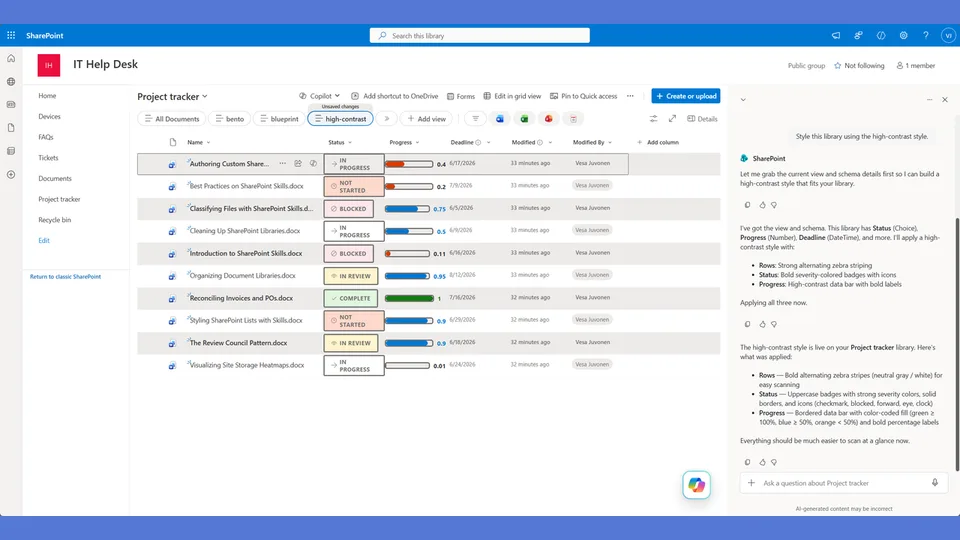
A SharePoint list style designed for maximum readability and accessibility. Large bold text, thick borders, alternating dark/light band rows, and a heavy left accent bar make every row easy to scan — useful for users who need high contrast or simply want no ambiguity in the UI.
What you get
- Design tokens optimized for WCAG contrast requirements — large text, thick borders, unambiguous status colors
- A
rowFormatterwith wide horizontal band rows and a dominant left accent bar - Status badges with heavy weight and large font size — readable at a glance
- Alternating row shading that remains legible even without color perception
Using this style
This is a style token skill — it provides design tokens and a reference rowFormatter, but does not apply them on its own. Pair it with the list-styling skill, which reads the tokens from this skill and adapts the row template to your library's actual columns.
Typical flow:
- Install both this skill and list-styling into your SharePoint Skills library.
- From a Copilot agent, ask: "Style this library using the high-contrast style."
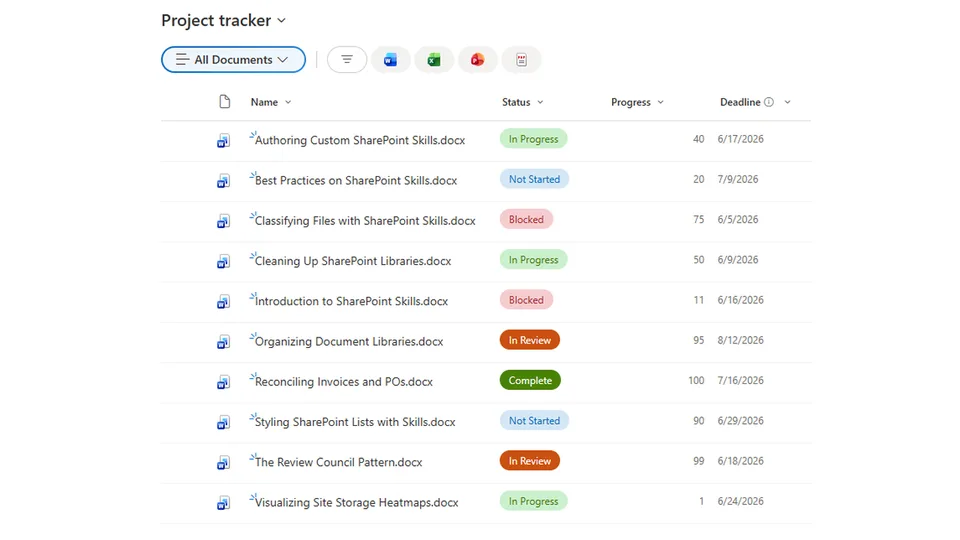
Looking for sample content to try it on? The list-styling demo ships with ten short Word documents and the exact Status, Progress, and Deadline column setup the row template expects.
When to use this style
Audience: accessibility-first scenarios, low-vision users, public-display screens, and anyone who needs the UI to leave zero ambiguity. Tone: blunt, oversized, AAA-contrast — readability is the design.
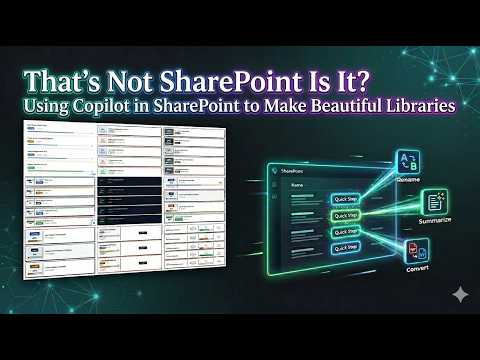
Demo video
SharePoint Skill
| Solution | Author(s) |
|---|---|
| style-high-contrast | Zach Rosenfield | GitHub | LinkedIn |
Version history
| Version | Date | Comments |
|---|---|---|
| 1.0 | May 2026 | Initial Release |
Disclaimer
THIS CODE IS PROVIDED AS IS WITHOUT WARRANTY OF ANY KIND, EITHER EXPRESS OR IMPLIED, INCLUDING ANY IMPLIED WARRANTIES OF FITNESS FOR A PARTICULAR PURPOSE, MERCHANTABILITY, OR NON-INFRINGEMENT.
Package
Ready to install
The ZIP contains only the upload-ready inner skill folder.
2c11ba93f3e18d1f411a2a38cd6ad55163873d3dc1cda181dde3c0ef867d97fdView SKILL.md
---
name: style-high-contrast
description: High Contrast accessibility style tokens and row template for the list-styling skill. Maximum contrast, large text, thick borders, alternating dark/light band rows, heavy left accent bar. Layout uses wide horizontal bands with large bold text for maximum readability. Use when the user says "high contrast," "accessible," "WCAG," "large text," or similar.
---

# High Contrast — Style Tokens + Row Template

Maximum readability. Thick borders. Large text. Each row is a wide horizontal band with alternating backgrounds and a heavy left accent bar color-coded to the status. Everything is designed to be read at arm's length.

**Layout philosophy: Wide bands with heavy accents.** No card separation — rows are wide horizontal bands with alternating light/dark backgrounds. A thick (6px) left accent bar marks each row's status. All text is oversized. Progress percentage is the largest element. Optimized for accessibility, not aesthetics.

## Badge Tokens

- padding: `6px 16px`
- border-radius: `4px`
- font-size: `14px`
- font-weight: `700`
- text-transform: `uppercase`

### status_colors

| Value | bg | text | border |
|---|---|---|---|
| Draft | `#1f2937` | `#ffffff` | `2px solid #1f2937` |
| In Review | `#1d4ed8` | `#ffffff` | `2px solid #1d4ed8` |
| Revising | `#b45309` | `#ffffff` | `2px solid #b45309` |
| Approved | `#047857` | `#ffffff` | `2px solid #047857` |
| Published | `#065f46` | `#ffffff` | `2px solid #065f46` |
| _fallback | `#374151` | `#ffffff` | `2px solid #374151` |

## Row Card Tokens

- row_border: `none` (bands, not cards)
- row_background_even: `#ffffff`
- row_background_odd: `#f8fafc`
- accent_width: `6px` (thick left accent bar)
- row_padding: `18px 24px`
- row_margin: `0px` (no gaps — continuous bands)
- overdue_background: `#fef2f2` (light red wash over entire row)

---

## Row Template Layout

Wide horizontal band. No card borders. Thick left accent. Alternating backgrounds.

```
┃█████ API Guide.docx         [IN REVIEW]       72%    5/15/2026         ┃
┃█████ ████████████████████████████████████░░░░░░░░░░░░░░               ┃
┃                                                          (white bg)    ┃
┃█████ Architecture Overview   [DRAFT]           35%    5/30/2026        ┃
┃█████ ███████████████░░░░░░░░░░░░░░░░░░░░░░░░░░░                      ┃
┃                                                          (gray bg)     ┃
  ↑ 6px left accent in status color. Overdue rows get pink wash.
```

## rowFormatter JSON

**Adapt before applying.** The column names below (`[$Status]`, `[$Progress]`, `[$Deadline]`) are example placeholders — replace them with the actual internal column names from the user's list. Also update every status value string ('Draft', 'In Review', 'Revising', etc.) to match the user's actual Choice values. Follow list-styling Step 3.

```json
{
  "$schema": "https://developer.microsoft.com/json-schemas/sp/v2/view-formatting.schema.json",
  "hideSelection": false,
  "hideColumnHeaders": true,
  "rowFormatter": {
    "elmType": "div",
    "style": {
      "display": "flex",
      "flex-direction": "column",
      "gap": "10px",
      "padding": "18px 24px",
      "border-left": "=if([$Status] == 'Draft', '6px solid #1f2937', if([$Status] == 'In Review', '6px solid #1d4ed8', if([$Status] == 'Revising', '6px solid #b45309', if([$Status] == 'Approved', '6px solid #047857', if([$Status] == 'Published', '6px solid #065f46', '6px solid #374151')))))",
      "background-color": "=if([$Deadline] < @now, '#fef2f2', if(@rowIndex % 2 == 0, '#ffffff', '#f8fafc'))",
      "border-bottom": "1px solid #d1d5db",
      "min-height": "80px"
    },
    "children": [
      {
        "elmType": "div",
        "style": {
          "display": "flex",
          "align-items": "center",
          "gap": "20px",
          "flex-wrap": "wrap"
        },
        "children": [
          {
            "elmType": "div",
            "style": {
              "flex": "2",
              "font-size": "16px",
              "font-weight": "700",
              "color": "#1f2937"
            },
            "txtContent": "=if([$FileLeafRef] == '', [$Title], [$FileLeafRef])"
          },
          {
            "elmType": "span",
            "txtContent": "[$Status]",
            "style": {
              "display": "inline-block",
              "padding": "6px 16px",
              "border-radius": "4px",
              "font-size": "14px",
              "font-weight": "700",
              "text-transform": "uppercase",
              "white-space": "nowrap",
              "color": "#ffffff",
              "background-color": "=if([$Status] == 'Draft', '#1f2937', if([$Status] == 'In Review', '#1d4ed8', if([$Status] == 'Revising', '#b45309', if([$Status] == 'Approved', '#047857', if([$Status] == 'Published', '#065f46', '#374151')))))",
              "border": "=if([$Status] == 'Draft', '2px solid #1f2937', if([$Status] == 'In Review', '2px solid #1d4ed8', if([$Status] == 'Revising', '2px solid #b45309', if([$Status] == 'Approved', '2px solid #047857', if([$Status] == 'Published', '2px solid #065f46', '2px solid #374151')))))"
            }
          },
          {
            "elmType": "span",
            "txtContent": "=toString([$Progress]) + '%'",
            "style": {
              "font-size": "24px",
              "font-weight": "800",
              "color": "#1f2937",
              "min-width": "60px",
              "text-align": "right"
            }
          },
          {
            "elmType": "div",
            "style": {
              "display": "flex",
              "align-items": "center",
              "gap": "6px"
            },
            "children": [
              {
                "elmType": "span",
                "txtContent": "📅",
                "style": { "font-size": "15px" }
              },
              {
                "elmType": "span",
                "txtContent": "=toLocaleDateString([$Deadline])",
                "style": {
                  "font-size": "15px",
                  "font-weight": "=if([$Deadline] < @now, '800', '500')",
                  "color": "=if([$Deadline] < @now, '#b91c1c', '#1f2937')"
                }
              },
              {
                "elmType": "span",
                "txtContent": "=if([$Deadline] < @now, '⚠ OVERDUE', '')",
                "style": {
                  "font-size": "14px",
                  "font-weight": "800",
                  "color": "#b91c1c"
                }
              }
            ]
          }
        ]
      },
      {
        "elmType": "div",
        "style": {
          "width": "100%",
          "height": "12px",
          "background-color": "#d1d5db",
          "border": "2px solid #1f2937",
          "border-radius": "2px",
          "overflow": "hidden"
        },
        "children": [
          {
            "elmType": "div",
            "style": {
              "width": "=toString([$Progress]) + '%'",
              "height": "100%",
              "border-radius": "0px",
              "background-color": "=if([$Progress] < 30, '#b91c1c', if([$Progress] < 66, '#b45309', '#047857'))"
            }
          }
        ]
      }
    ]
  }
}
```

---

## Checklist — "I Can't Believe That's SharePoint"

- ✅ Full rowFormatter — NOT default column grid
- ✅ Wide horizontal BANDS — not cards (no card separation, no rounded corners, no shadow)
- ✅ 6px thick left accent bar in status color
- ✅ Alternating row backgrounds (white / light gray) — even vs odd
- ✅ Overdue rows get full pink wash background
- ✅ ALL text is oversized (14-24px) — readable at arm's length
- ✅ Progress percentage is 24px and bold — second-largest element
- ✅ 12px thick progress bar with dark border — chunkiest of all styles
- ✅ Dark, high-contrast colors (WCAG AAA)
- ✅ 📅 icon + large date (15px)
- ✅ Different from ALL others: bands vs cards, no shadows, no rounded corners, maximum density

---

## Responsive / mobile

- **≤ 600 px**: collapse the band by reducing the left-accent bar from 8 px to 4 px and stacking the title above the chips. Keep band height ≥ 64 px so the row is still a comfortable touch target.
- **Never reduce any text below 16 px on mobile.** This style trades density for legibility; shrinking text defeats the purpose. If the layout doesn't fit, drop fields, do not shrink type.
- **≤ 480 px**: hide the progress label ("Progress") — the numeral and the bar are self-explanatory.
- **Touch targets**: rows are 64 px tall and clickable; this is already mobile-friendly by default.

## Implementation notes

### WCAG contrast claim (pinned)

The shipped token pairs were verified at WebAIM at design time:

| Pair | Use | Ratio | WCAG |
|---|---|---|---|
| `#0F172A` BG + `#FFFFFF` text | Dark band background + body text | ≈ 17.4 : 1 | **AAA** (normal & large) |
| `#F8FAFC` BG + `#0F172A` text | Light band background + body text | ≈ 16.8 : 1 | **AAA** (normal & large) |
| `#0078D4` accent on `#F8FAFC` | Accent text / left bar on light | ≈ 4.6 : 1 | **AA** (large text only) |
| `#DC2626` overdue on `#F8FAFC` | Overdue red on light | ≈ 5.9 : 1 | **AA** (normal) |
| `#FFFFFF` on `#DC2626` | Overdue badge text | ≈ 4.8 : 1 | **AA** (normal) |

If any of these tokens are re-skinned, **re-verify** the affected pairs in [WebAIM contrast checker](https://webaim.org/resources/contrastchecker/) before publishing. Never lower an existing AAA pair to AA without an explicit decision.
References
- agentskills.io specification
The specification that SharePoint AI skills follow for installation and discovery.
- List Styling Engine
The companion skill that applies these style tokens to a SharePoint list.
- Demo video
Walkthrough of the list-styling engine and supporting style token skills.
Discuss this skill
Ask a question, share how you used it, or suggest an improvement with the community.
Open GitHub Discussions