
From the contributor
How to use this sample
Summary
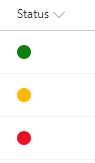
This sample displays a traffic light style (Red-Yellow-Green) status indicator based on the value of a choice/text column (to use a lookup column, switch all occurrences of @currentField to @currentField.lookupValue).
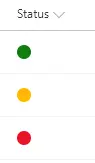
The text values for the column are expected to be Red, Yellow, or Green. Any other values won't be shown.
View requirements
- This format can be applied to a text/choice column and expects the values to be Green, Yellow, Red, or anything else
Sample
| Solution | Author(s) |
|---|---|
| text-ryg-status-indicator.json | Travis Lingenfelder |
Version history
| Version | Date | Comments |
|---|---|---|
| 1.0 | November 27, 2017 | Initial release |
| 1.1 | March 22, 2018 | Simplified logic |
| 1.2 | August 20, 2018 | Updated to use Excel-style expressions and theme classes |
Disclaimer
THIS CODE IS PROVIDED AS IS WITHOUT WARRANTY OF ANY KIND, EITHER EXPRESS OR IMPLIED, INCLUDING ANY IMPLIED WARRANTIES OF FITNESS FOR A PARTICULAR PURPOSE, MERCHANTABILITY, OR NON-INFRINGEMENT.
Additional notes
For more information on using this custom formatting see the article SharePoint Modern List Traffic Light (Red-Yellow-Green) Status Indicator Column
An additional version using Abstract Tree Syntax (AST) is also provided for environments where the Excel-style expressions are not supported.