
From the contributor
How to use this sample
Summary
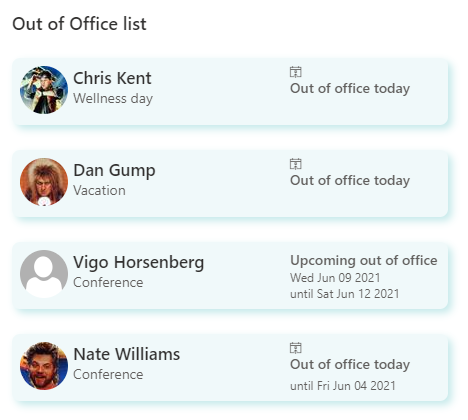
This sample shows how to format a list to show upcoming employee time away from office. It features the following:
- Responsive layout through flexbox
- Conditionally showing a today icon if the out of office overlaps the current date
- Conditionally changing the text which shows based on if the out of office start date is the current date
- Use of theme color classes to ensure the format displays as intended regardless of theme (light, dark, custom, etc.)
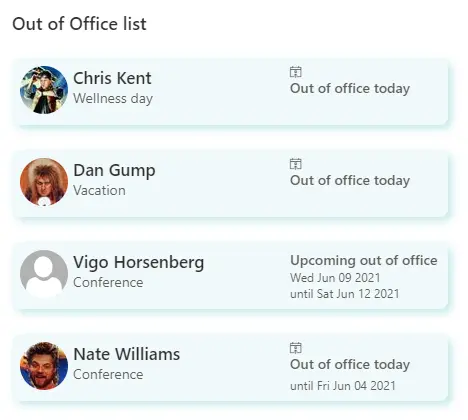
This sample is derived from the birthdays sample.
View requirements
| Type | Internal Name | Required |
|---|---|---|
| Single line of text | Title | Yes |
| Person | Who | Yes |
| Date Time | Startdate | Yes |
| Date Time | Enddate | No |
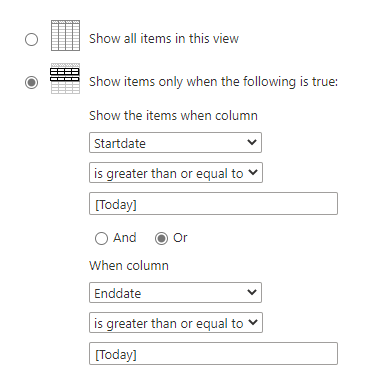
This sample relies on having a View set up which filters to only show items where either the Start date or the End date is greater than or equal to the current date. Make sure to apply the necessary filters in your view for this to work:
Sample
| Solution | Author(s) |
|---|---|
| out-of-office.json | Tom Resing |
Version history
| Version | Date | Comments |
|---|---|---|
| 1.0 | May 14, 2021 | Initial release |
Disclaimer
THIS CODE IS PROVIDED AS IS WITHOUT WARRANTY OF ANY KIND, EITHER EXPRESS OR IMPLIED, INCLUDING ANY IMPLIED WARRANTIES OF FITNESS FOR A PARTICULAR PURPOSE, MERCHANTABILITY, OR NON-INFRINGEMENT.