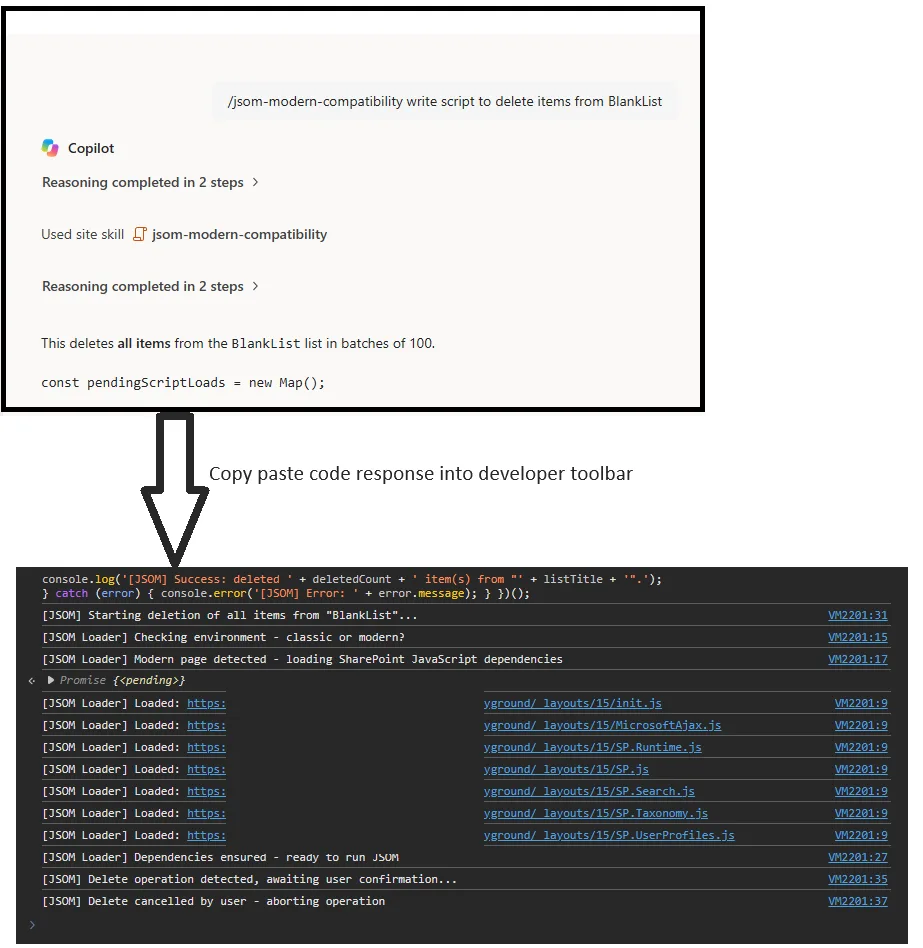
Generates ready-to-copy JSOM scripts that end users can paste directly into the browser developer console on SharePoint pages without manually handling dependency loading.
Supports classic SharePoint pages, modern SharePoint pages, and SharePoint 2013 classic pages. Ensures core SharePoint JavaScript libraries such as SP.js, SP.Search.js, SP.Taxonomy.js, and SP.UserProfiles.js are loaded before business logic runs.
Uses the current site URL as the base for loading SharePoint JavaScript dependencies so subsites and site collections resolve libraries correctly instead of falling back to the tenant root site.
Optimized for end users by returning one complete JavaScript code block, concise console logging, short run instructions, and a safety warning for destructive operations.
Generates ready-to-copy JSOM scripts for SharePoint end users so they can paste one complete script into the browser developer console without worrying about JS dependency loading.
What problem it solves
Modern SharePoint pages do not load the legacy JSOM chain by default, which causes errors such as SP is not defined. Classic pages, including SharePoint 2013-style pages, may already have some JSOM libraries available, but users still benefit from one compatibility-first script that works across both page types.
What you get
- One complete ready-to-copy JavaScript script in a single code block
- Compatibility support for classic, modern, and SharePoint 2013 classic pages
- Automatic loading of required SharePoint JavaScript dependencies before business logic runs
- Support for JSOM scenarios involving lists, libraries, search, taxonomy, and user profiles
- Lightweight milestone logging suitable for browser console execution
- Delete confirmation guidance for destructive operations
- End-user run instructions and a safety warning footer
- A footer note telling users to check for HTML encoding and request a clean resend if needed
Supported scenarios
- Classic SharePoint pages
- Modern SharePoint pages
- SharePoint 2013 classic-style JSOM usage
- JSOM for lists, libraries, search, taxonomy, user profiles, and related SharePoint client-side APIs
Dependency strategy
Core dependency order:
init.jsMicrosoftAjax.jsSP.Runtime.jsSP.jsSP.Search.jsSP.Taxonomy.jsSP.UserProfiles.js
The skill prefers official SharePoint documentation and Microsoft Learn guidance when shaping JSOM patterns and dependency handling.
SharePoint JavaScript files must be loaded relative to the current site URL, not from the tenant root site. For example, if the user is on https://tenant.sharepoint.com/sites/playground, the loader should use https://tenant.sharepoint.com/sites/playground/_layouts/15/....
Additional supporting SharePoint JavaScript files are loaded only when the requested task needs them, for example:
sp.documentmanagement.jssp.publishing.jssp.requestexecutor.js
Output behavior
The skill is optimized to return:
- one short explanation;
- one complete JavaScript code block;
- short run instructions;
- one safety warning with a warning icon.
The generated code must be directly runnable in the browser console without manual cleanup. HTML-encoded operators, quotes, arrows, or comparison symbols are treated as invalid output unless the user explicitly asked for encoded text.
The skill now includes a final quality-check step before returning code so encoded output should be rewritten before the user sees it.
It also includes a renderer-safe check so encoded entities introduced by chat rendering are treated as invalid for runnable code.
A very important mandatory rule is that the rendered code block must not show HTML-encoded operators or syntax. For example, & must never appear as & in runnable code.
If a clean runnable code block cannot be produced without encoding, the skill may fall back to plain text code so the user still receives unencoded runnable JavaScript.
Logging behavior
The skill now favors lightweight logging:
- startup log
- dependency-loading logs
- execution-start log
- success summary log
- error log
It avoids excessive per-item logging unless the user explicitly asks for verbose diagnostics.
Performance behavior
The skill also guides generated code to reduce throttling risk for large-list or resource-intensive operations by using targeted queries, row limits, paging, and safe chunking patterns. For batching logic, it prefers official SharePoint documentation and falls back to normal JSOM implementations when batching guidance is ambiguous.
SharePoint Skill
| Solution | Author(s) |
|---|---|
| jsom-modern-compatibility | Rohit Devmore | GitHub | LinkedIn |
Version history
| Version | Date | Comments |
|---|---|---|
| 1.0 | October 2026 | Initial Release |
Disclaimer
THIS CODE IS PROVIDED AS IS WITHOUT WARRANTY OF ANY KIND, EITHER EXPRESS OR IMPLIED, INCLUDING ANY IMPLIED WARRANTIES OF FITNESS FOR A PARTICULAR PURPOSE, MERCHANTABILITY, OR NON-INFRINGEMENT.
Package
Ready to install
The ZIP contains only the upload-ready inner skill folder.
1abc227556c6682cb9cccec3310659a277b4f1d4ad653e86bae13e5faff2f7e8View SKILL.md
---
name: jsom-modern-compatibility
description: |-
Generate ready-to-copy JSOM (JavaScript Object Model) code that runs on both classic and modern SharePoint pages, including SharePoint 2013 classic pages, by ensuring required SharePoint JavaScript dependencies are loaded before business logic runs.
Use when the user says:
- "write JSOM code"
- "fix JSOM"
- "run JSOM on a modern page"
- "SP is not defined"
- "sp.js is missing"
- "get list items with JSOM"
- "use JSOM for taxonomy"
- "use JSOM for user profiles"
- "use JSOM for search"
---
# JSOM Modern Compatibility
## Purpose
Generate ready-to-copy JavaScript that end users can paste directly into the browser developer console on SharePoint pages without manually handling JSOM dependency loading.
The generated script must work on:
- classic SharePoint pages;
- modern SharePoint pages;
- SharePoint 2013 classic pages.
## Core principle
Compatibility first.
Classic pages often already have JSOM available. Modern pages usually do not. The generated script must always ensure the required SharePoint JavaScript libraries are available before any requested business logic runs.
## Documentation preference
Prefer official SharePoint documentation and Microsoft Learn guidance when shaping JSOM patterns, dependency handling, and API usage.
Use Microsoft Learn as the primary reference source before relying on informal examples.
Preferred references:
- [Connect to SharePoint using the JavaScript Object Model (JSOM) | Microsoft Learn](https://learn.microsoft.com/en-us/sharepoint/dev/spfx/web-parts/guidance/connect-to-sharepoint-using-jsom)
- [Complete basic operations using JavaScript library code in SharePoint | Microsoft Learn](https://learn.microsoft.com/en-us/sharepoint/dev/sp-add-ins/complete-basic-operations-using-javascript-library-code-in-sharepoint)
## When to use
Apply this skill to JSOM generation, troubleshooting, dependency loading, and SharePoint JSOM operations including lists/libraries, Search, Taxonomy, and User Profiles.
## Output requirements
Every runnable answer must include:
1. exactly one complete JavaScript code block;
2. the compatibility loader plus the requested business logic;
3. short run instructions outside the code block;
4. the safety footer outside the code block.
Do not split one runnable script across multiple code blocks or place explanatory prose inside the code block.
## Encoding and renderer-safe output
Runnable JavaScript must use raw JavaScript syntax and contain no HTML-encoded operators, quotes, comparison symbols, or arrow functions unless they came from the user's own content or instructions.
Before responding, verify the rendered code remains directly copy/paste executable. If rendering cannot preserve raw syntax, return the script as plain text instead of a fenced code block.
When CAML or XML is required and direct markup may render unsafely in chat, prefer safer construction patterns that preserve copy-paste execution.
Prefer classic JavaScript syntax in the boilerplate and generated script when it improves renderer-safe copy/paste reliability.
## Dependency-loading rules
Always ensure the base JSOM dependencies required for the task are available before business logic runs:
- `init.js`
- `MicrosoftAjax.js`
- `SP.Runtime.js`
- `SP.js`
Load feature-specific libraries only when needed:
- `SP.Search.js` for Search
- `SP.Taxonomy.js` for Managed Metadata
- `SP.UserProfiles.js` for User Profiles
- other supporting libraries such as `sp.documentmanagement.js`, `sp.publishing.js`, or `sp.requestexecutor.js` only when the requested task needs them
Always load SharePoint JavaScript files relative to the current site, not from the tenant root site unless the current site itself is the root site.
Correct pattern:
- current page: `https://tenant.sharepoint.com/sites/playground/...`
- load from: `https://tenant.sharepoint.com/sites/playground/_layouts/15/SP.Search.js`
Incorrect pattern:
- `https://tenant.sharepoint.com/_layouts/15/SP.Search.js`
Use the current web URL or current site URL as the base for `/_layouts/15/` so the generated script stays scoped to the site where the user is running it.
## Logging guidance
Keep logging helpful but lightweight.
Required logs:
- one startup log showing the task and detected page mode;
- one environment/dependency log sequence from the loader;
- one execution-start log before `executeQueryAsync`;
- one success summary log;
- one error log with the SharePoint error message.
Avoid noisy logging.
- Do not log inside tight loops.
- Do not log every item unless the user explicitly asks for verbose diagnostics.
- For larger result sets, log a summary count only.
- Use `console.log` for normal milestones, `console.warn` for recoverable dependency issues, and `console.error` for failures.
## Performance and throttling guidance
Some requested operations may target large lists, large libraries, or resource-intensive SharePoint workloads.
Generate implementations that reduce the risk of HTTP 429 throttling and avoid unnecessary server load.
When relevant:
- prefer targeted queries over broad reads;
- request only the fields that are needed;
- use CAML filters, row limits, and paging for large lists;
- avoid loading entire lists when the task only needs a subset;
- process items in manageable chunks instead of one massive operation;
- avoid unnecessary repeated `executeQueryAsync` calls inside tight loops;
- for bulk updates or deletes, batch work in smaller groups and log progress by batch;
- if the task is likely to be expensive, mention that the script is designed to reduce throttling risk.
For batching logic, prefer official SharePoint documentation and Microsoft Learn guidance.
If batching guidance is ambiguous, incomplete, or not clearly applicable to the requested scenario, avoid batching and use a normal JSOM implementation instead.
Do not invent unsupported batching patterns.
For large-list scenarios, prefer implementations that are safe for non-technical users to run in the browser console without overwhelming the site.
## Delete safety rule
For delete operations or other clearly destructive, irreversible bulk operations, include this confirmation block before the destructive action:
```javascript
// --- DELETE SAFETY CONFIRMATION - COMMENT OUT TO BYPASS ---
console.log('[JSOM] Delete operation detected, awaiting user confirmation...');
if(!confirm('WARNING Are you sure you want to DELETE? This cannot be undone. OK=Proceed, Cancel=Abort')){
console.log('[JSOM] Delete cancelled by user - aborting operation');
return;
}
console.log('[JSOM] Delete confirmed by user - proceeding');
// --- END DELETE CONFIRMATION ---
```
## Mandatory compatibility boilerplate
Use this pattern in every generated script and adapt it only as needed for the requested task:
```javascript
var JSOM_LOAD_TIMEOUT_MS = 15000;
var JSOM_READY_POLL_MS = 100;
var pendingScriptLoads = new Map();
function getPath(root, path) {
var parts = path.split('.');
var current = root;
var i;
for (i = 0; i < parts.length; i++) {
if (current === null || current === undefined) {
return undefined;
}
current = current[parts[i]];
}
return current;
}
var JSOM_LIBRARY_READY_CHECKS = {
'init.js': function() {
return typeof getPath(window, 'SP.SOD.executeOrDelayUntilScriptLoaded') === 'function' ||
typeof window.ExecuteOrDelayUntilScriptLoaded === 'function';
},
'microsoftajax.js': function() {
return typeof getPath(window, 'Type.registerNamespace') === 'function';
},
'sp.runtime.js': function() {
return typeof getPath(window, 'SP.ClientRuntimeContext') === 'function';
},
'sp.js': function() {
return typeof getPath(window, 'SP.ClientContext') === 'function';
},
'sp.search.js': function() {
return typeof getPath(window, 'Microsoft.SharePoint.Client.Search.Query.KeywordQuery') === 'function';
},
'sp.taxonomy.js': function() {
return typeof getPath(window, 'SP.Taxonomy.TaxonomySession') === 'function';
},
'sp.userprofiles.js': function() {
return typeof getPath(window, 'SP.UserProfiles.PeopleManager') === 'function';
},
'sp.documentmanagement.js': function() {
return typeof getPath(window, 'SP.DocumentSet.DocumentSet') === 'function';
},
'sp.publishing.js': function() {
return typeof getPath(window, 'SP.Publishing.PublishingWeb') === 'function';
},
'sp.requestexecutor.js': function() {
return typeof getPath(window, 'SP.RequestExecutor') === 'function';
}
};
// When you load a library that is not listed above, add a readiness check for it here.
// Without one, a pre-existing tag for that library can only settle by a load or error
// event, and otherwise rejects at the timeout instead of hanging.
function getReadyCheck(file) {
return JSOM_LIBRARY_READY_CHECKS[file.toLowerCase()] || null;
}
function isLibraryReady(file) {
var check = getReadyCheck(file);
if (!check) {
return false;
}
try {
return !!check();
} catch (error) {
return false;
}
}
function hasRequiredJsomNamespaces() {
return isLibraryReady('init.js') &&
isLibraryReady('MicrosoftAjax.js') &&
isLibraryReady('SP.Runtime.js') &&
isLibraryReady('SP.js');
}
function getVerifiedWebAbsoluteUrl() {
var pageInfo = window._spPageContextInfo;
if (pageInfo && pageInfo.webAbsoluteUrl) {
return pageInfo.webAbsoluteUrl.replace(/\/$/, '');
}
throw new Error(
'Unable to determine the current SharePoint web URL. ' +
'window._spPageContextInfo.webAbsoluteUrl is required on this page.'
);
}
function findExistingScript(src) {
var scripts = document.getElementsByTagName('script');
var target = src.toLowerCase();
var i;
for (i = 0; i < scripts.length; i++) {
if (scripts[i].src && scripts[i].src.toLowerCase() === target) {
return scripts[i];
}
}
return null;
}
// Waits for one library to become usable. Settles on whichever happens first:
// the readiness check passes, a load or error event fires, or the timeout expires.
// It never assumes that a script tag being present means the library is ready.
function waitForLibrary(script, file, src) {
return new Promise(function(resolve, reject) {
var settled = false;
var pollTimer = null;
var timeoutTimer = null;
var hasCheck = !!getReadyCheck(file);
function cleanup() {
settled = true;
if (pollTimer) {
clearInterval(pollTimer);
}
if (timeoutTimer) {
clearTimeout(timeoutTimer);
}
script.removeEventListener('load', onLoad);
script.removeEventListener('error', onError);
}
function succeed() {
if (settled) {
return;
}
cleanup();
script.dataset.loadState = 'loaded';
resolve();
}
function fail(message) {
if (settled) {
return;
}
cleanup();
script.dataset.loadState = 'failed';
reject(new Error(message));
}
function onLoad() {
if (!hasCheck || isLibraryReady(file)) {
succeed();
} else {
fail('Loaded but not initialized: ' + src);
}
}
function onError() {
fail('Load failed: ' + src);
}
if (isLibraryReady(file)) {
succeed();
return;
}
if (script.dataset.loadState === 'failed') {
fail('Previously failed: ' + src);
return;
}
if (script.dataset.loadState === 'loaded' && !hasCheck) {
succeed();
return;
}
script.addEventListener('load', onLoad);
script.addEventListener('error', onError);
if (hasCheck) {
pollTimer = setInterval(function() {
if (isLibraryReady(file)) {
succeed();
}
}, JSOM_READY_POLL_MS);
}
timeoutTimer = setTimeout(function() {
fail('Timed out after ' + JSOM_LOAD_TIMEOUT_MS + ' ms waiting for ' + src +
' (the script tag exists but the library never became ready)');
}, JSOM_LOAD_TIMEOUT_MS);
});
}
function loadScript(file, src) {
var key = src.toLowerCase();
var promise;
if (pendingScriptLoads.has(key)) {
return pendingScriptLoads.get(key);
}
promise = Promise.resolve().then(function() {
var script;
if (isLibraryReady(file)) {
return;
}
script = findExistingScript(src);
if (!script) {
script = document.createElement('script');
script.src = src;
script.dataset.loadState = 'loading';
document.head.appendChild(script);
}
return waitForLibrary(script, file, src).then(function() {
console.log('[JSOM Loader] Ready: ' + file);
});
}).finally(function() {
pendingScriptLoads.delete(key);
});
pendingScriptLoads.set(key, promise);
return promise;
}
async function ensureJSOMLibraries(extraFiles) {
console.log('[JSOM Loader] Checking environment - classic or modern?');
var siteBase = getVerifiedWebAbsoluteUrl();
var chain = ['init.js', 'MicrosoftAjax.js', 'SP.Runtime.js', 'SP.js'];
var i;
var file;
if (extraFiles) {
for (i = 0; i < extraFiles.length; i++) {
chain.push(extraFiles[i]);
}
}
if (hasRequiredJsomNamespaces()) {
console.log('[JSOM Loader] Classic page detected - core JSOM already available');
} else {
console.log('[JSOM Loader] Modern or partially initialized page - ensuring SharePoint JavaScript dependencies');
}
// Load in order and stop at the first failure: later libraries depend on earlier ones.
for (i = 0; i < chain.length; i++) {
file = chain[i];
try {
await loadScript(file, siteBase + '/_layouts/15/' + file);
} catch (error) {
console.error('[JSOM Loader] ' + file + ': ' + error.message);
throw new Error('Required SharePoint JavaScript dependency failed: ' + file + ' (' + error.message + ')');
}
}
if (!hasRequiredJsomNamespaces()) {
throw new Error('JSOM dependencies did not initialize correctly. SP.SOD, Type, SP.ClientRuntimeContext or SP.ClientContext is unavailable.');
}
console.log('[JSOM Loader] Dependencies ensured - ready to run JSOM');
}
```
Additional requirements for every generated script:
- Do not use `window.location.origin` as a fallback SharePoint web URL.
- Do not continue business logic if any required dependency fails to load, fails to initialize, or times out.
- Do not assume an existing script tag means the library is ready. Check each library's own readiness (its namespace) whether or not the tag carries the loader's `data-load-state` marker, because SharePoint or another loader may have inserted it and already finished or failed.
- Never wait on a script without a bounded timeout. The loader rejects with an explicit error after `JSOM_LOAD_TIMEOUT_MS` (default 15000) instead of hanging.
- When adding a library that is not in `JSOM_LIBRARY_READY_CHECKS`, add a readiness check for it.
- Always verify `SP.SOD`, `Type.registerNamespace`, `SP.ClientRuntimeContext`, and `SP.ClientContext` before reporting readiness.
## Code-generation procedure
1. Identify the requested SharePoint task.
2. Determine whether extra SharePoint JavaScript libraries are needed.
3. Determine whether the task may hit large lists, bulk operations, or resource-intensive patterns.
4. Generate one complete JavaScript script that:
- starts with a concise startup log;
- ensures dependencies are loaded;
- initializes `SP.ClientContext`;
- uses throttling-aware query and batching patterns when relevant;
- runs the requested business logic;
- logs a concise success summary or a clear error.
5. If the task is destructive, include the delete confirmation block.
6. Run a final output quality check on the full script before returning it.
7. Return the script in exactly one fenced JavaScript code block only after it passes the quality check.
8. After the code block, include the run instructions and safety footer.
## Preferred response shape
Use this order:
1. one sentence saying what the script does;
2. one fenced JavaScript code block containing the full script;
3. short run instructions;
4. the safety footer.
## Final output quality check
Before responding, verify:
- runnable JavaScript contains no HTML-encoded syntax unless it came from the user's own content or instructions;
- the script is syntactically valid for direct browser-console execution;
- dependency URLs use the current SharePoint web URL;
- all runnable JavaScript is contained in exactly one code block;
- explanatory text remains outside the code block.
If any check fails, correct it before responding.
## How to run this code
Always include this guidance after the code block:
To run this code:
1. Open your SharePoint page in Chrome or Edge where you want to run this.
2. Press Ctrl+Shift+J on Windows or Cmd+Option+J on Mac to open Developer Tools.
3. Open the Console tab.
4. If needed, refer to the Microsoft Edge DevTools Console guide for running JavaScript in the console: https://learn.microsoft.com/en-us/microsoft-edge/devtools/console/console-javascript
5. Copy the full JavaScript code block and paste it into the console.
6. Press Enter and watch the `[JSOM]` and `[JSOM Loader]` messages.
7. For delete operations, only click OK in the confirmation dialog if you are sure.
## Mandatory footer
Always end with this warning outside the code block and prefix it with a small warning icon.
Always add a short follow-up note telling the user to review the rendered code for any HTML encoding before running it.
⚠️ Custom Code Execution Notice: This is custom JSOM code generated for your SharePoint site. Please review and run it responsibly. JSOM operations can permanently create, update, or delete data, list items, taxonomy terms, and user profile properties depending on the logic you execute. Test in a non-production site first and ensure you have proper backups and permissions. You are responsible for the changes this code makes. Compatible with classic and modern SharePoint pages, including SharePoint 2013 classic pages, when executed in a browser that supports the JavaScript features used by the loader.
Review the rendered code before running it. If you see any HTML encoding such as `&`, `<`, `>`, `"`, `'`, or `=>`, send this follow-up prompt:
`Send code without any HTML encoding and make sure its rendered in response without encoding`
References
- agentskills.io specification
The specification that SharePoint AI skills follow for installation and discovery.
- Connect to SharePoint using the JavaScript Object Model (JSOM)
Microsoft Learn guidance for connecting to SharePoint with JSOM in SharePoint Framework scenarios.
- Complete basic operations using JavaScript library code in SharePoint
Microsoft Learn guidance for SharePoint JavaScript object model usage and dependency loading.
- JavaScript API reference for SharePoint 2013
Archived Microsoft Learn reference for SharePoint 2013 JavaScript libraries including search, taxonomy, and user profiles.
Discuss this skill
Ask a question, share how you used it, or suggest an improvement with the community.
Open GitHub Discussions