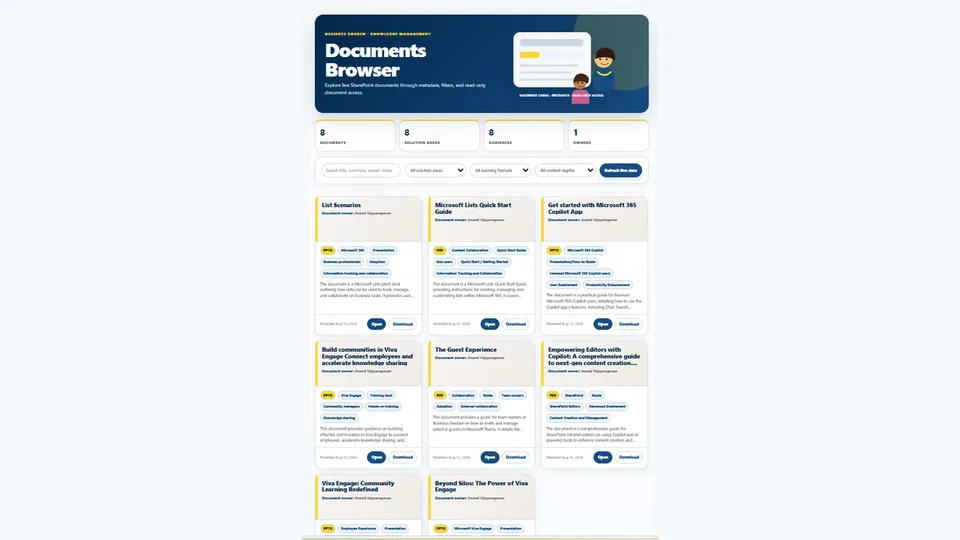
Generates a fully self-contained, live-linked HTML dashboard for browsing a SharePoint document library.
Uses real metadata fields, search, filters, Document Title and Document Owner on cards, hover/focus abstract previews, and a clean 3-column desktop card layout.
Applies a clean navy-and-yellow design system with rounded hero header and a visible Refresh live data control.
Includes robust, decoded server-relative Open and Download links that work inside the SharePoint HTML preview experience.
Ideal for knowledge bases, document libraries with rich metadata, and teams that need a scannable, filterable document browser.
Creates a professional live-linked document browser dashboard for a SharePoint document library. Uses real metadata fields, Knowledge Explorer header styling, a visible refresh control, reliable Open/Download links, and a clean 3-card desktop layout.
What you get
- Live-linked dashboard that reflects new or updated documents after refresh (when supported)
- Knowledge Explorer-style header with navy, blue, yellow, and sand color system
- Exactly 3 document cards per desktop row (responsive to 2 then 1)
- Cards show Document Title, Document Owner below the title, abstract preview, metadata pills, and dates
- Search across title, filename, abstract, metadata, owner, and contacts
- Filters driven by real library fields (Practice, Service Area, Industry, Market, Regions, Document Type, Year, etc. when present)
- Robust SharePoint Open and Download links that work inside the HTML preview experience
- Visible “Refresh live data” control
- Fully self-contained HTML with no external dependencies beyond the live-data binding
Good to know
- Document "Open" experience is designed to open with "embedview" experience. Sometimes Copilot does not produce it as written in Skill. Emphasize in chat to follow the skill strictly, that is if the "embedview" experience is what you are after.
- Thumbnails of documents is not supported yet, is what I figured.
- People pictures (person columns) of is not supported yet, is what I figured.
- Only supports on root folder in library.
SharePoint Skill
| Solution | Author(s) |
|---|---|
| document-browser | Anand Ragavan | GitHub | LinkedIn |
Version history
| Version | Date | Comments |
|---|---|---|
| 1.0 | August 2026 | Initial Release |
Disclaimer
THIS CODE IS PROVIDED AS IS WITHOUT WARRANTY OF ANY KIND, EITHER EXPRESS OR IMPLIED, INCLUDING ANY IMPLIED WARRANTIES OF FITNESS FOR A PARTICULAR PURPOSE, MERCHANTABILITY, OR NON-INFRINGEMENT.
Package
Ready to install
The ZIP contains only the upload-ready inner skill folder.
View SKILL.md
---
name: document-browser
description: |-
  Create or update a professional live-linked document browser dashboard for a SharePoint document library, using real metadata fields, a clean navy-and-yellow design system, visible refresh, reliable SharePoint Open/Download links, and a 3-card desktop layout.

  Use when the user says:
    - "create a document browser"
    - "make a live dashboard for this document library"
    - "build a document library dashboard"
    - "use the document browser skill on this library"
    - "make sure the dashboard is live linked"
---
# Document Browser

## When to use
Use this skill when the user wants a professional document browser dashboard for a SharePoint document library or folder. The dashboard must browse documents using real metadata, search, filters, cards, read-only Open links, Download links, and live-linked data whenever supported.

## Inputs
- Target SharePoint document library URL, list ID, or selected/current library.
- Optional folder path inside the library.
- Optional approval rule, default: show approved documents only when content approval is enabled.
- Optional dashboard file name and destination folder.
- Optional requested filters.

## Steps
1. **Resolve and inspect**
   - Resolve the target library ID and web URL.
   - Retrieve the full schema and use internal field names only.
   - Identify approval status, Document Title, name/path fields, description/abstract, metadata filters, Document Owner, contacts, author/editor, created/modified dates.

2. **Title and owner rules**
   - Prefer **Document Title** for card titles. Match `Document Title`, `documentTitle`, and `Document_x0020_Title`.
   - Fall back to `Title`, then file name.
   - Show **Document Owner** name directly below the card title. Match `documentOwner` / `Document Owner`; fall back to Author only if no owner exists.

3. **Live-linked build**
   - Use LiveData/list binding for supported library roots or list sources.
   - Include `ka-livedata-manifest` and runtime code that reads `window.__LD_RESULTS__`.
   - Include a visible **Refresh live data** button wired to `refresh()`.
   - Don't claim live-linked unless newly added/updated source documents appear after refresh without regenerating HTML.

4. **Design requirements**
   Use this exact visual system:

   **Color palette**
   - Navy: `#03274A`
   - Blue: `#164C80`
   - Yellow accent: `#FFD633`
   - Pale blue: `#CAD8E5`
   - Line / border: `#D7E2EC`
   - Sand background: `#F7F5F3`
   - Text: `#161616`
   - Muted text: `#5A5A57`

   **Typography**
   - Primary font stack: Aptos, "Segoe UI", Arial, sans-serif

   **Hero header**
   - Large rounded navy (or navy-to-blue gradient) hero banner
   - Soft yellow translucent circle accent in the upper-right
   - Short uppercase kicker in yellow with letter-spacing
   - Large white title
   - Pale lead text under the title
   - Optional simple flat-vector illustration on the right side of the hero

   **Layout & cards**
   - Exactly 3 document cards per desktop row (`grid-template-columns: repeat(3, minmax(0, 1fr))`), collapsing to 2 then 1 on smaller screens
   - White cards with subtle border (`#D7E2EC`), soft shadow, and large border-radius (~20–22px)
   - Left yellow accent bar on the card header area
   - Document title in navy, bold
   - Document Owner / contacts shown directly under the title in muted text
   - Abstract preview with hover/focus popup
   - Metadata shown as small rounded pills
   - Pill-shaped action buttons (primary = solid blue, secondary = outlined)

   **Overall feel**
   - Clean, modern, professional knowledge-browser aesthetic
   - Generous white space, soft shadows, clear hierarchy
   - Card-first design (avoid dense tables)

5. **Dashboard features**
   - Search across Document Title/title, filename, abstract/description, metadata, Document Owner, contacts, author/editor.
   - Filter using real fields. Prefer Practice, Service Area, Industry Sectors, Market, Regions, Lead Office, Document Type, Year created when present.
   - Cards include title, Document Owner below title, abstract preview with hover/focus popup, metadata pills, dates, Open and Download actions.

6. **Open and Download link rules — critical**
   - In SharePoint HTML preview the dashboard runs inside `about:srcdoc`; **do not use `location.origin`** for Open or Download because it may resolve to `null`.
   - Define a constant site URL from the resolved web URL, e.g. `var SITE='https://tenant.sharepoint.com/sites/site';`.
   - Do not render `href="#"`. If no path is available, render a disabled text control instead.
   - Build links from a decoded server-relative SharePoint path.
   - Resolve path in this order: `FileRef` / `File_x0020_Ref` / `ServerRelativeUrl` / `Path`; then `EncodedAbsUrl` parsed to `pathname`; then `FileDirRef + '/' + FileLeafRef`.
   - Use `safeDecode()` repeatedly before encoding route parameters so `Documents%2520Browser` becomes `Documents Browser`, then re-encodes only once.
   - **Verified working Open pattern:** `SITE + '/_layouts/15/Doc.aspx?sourcedoc=' + encodeURIComponent(serverRelativePath) + '&file=' + encodeURIComponent(fileName) + '&action=embedview&mobileredirect=true'`.
   - The `serverRelativePath` must be decoded first, then encoded exactly once in the `sourcedoc` route parameter.
   - Do **not** replace this with the direct file URL `?web=1&action=embedview` unless it has been manually tested in the target dashboard after saving.
   - Do **not** use `download.aspx?SourceUrl=...&transform=pdf` for Open; it can fail with File Not Found when spaces are double-encoded.
   - Download: `SITE + '/_layouts/15/download.aspx?SourceUrl=' + encodeURIComponent(serverRelativePath)`.
   - Add `target="_blank"`, `rel="noopener"`, and `data-interception="off"`.
   - Never use PDF transform links for Open; never append `download=1`; validate no `%2520`, no `null/sites`, no `href="#"`, and no absolute URL inside `SourceUrl`.

7. **Validate before saving**
   - Confirm live manifest/source exists.
   - Confirm visible refresh control exists and is wired.
   - Confirm 3-column desktop grid exists.
   - Confirm Document Title is first title source and Document Owner appears below title.
   - Confirm the navy / yellow / sand design system and hero structure are present.
   - Confirm Open uses the verified `Doc.aspx?sourcedoc=...&file=...&action=embedview&mobileredirect=true` pattern; confirm Download uses `SITE`, robust source-path fallback, and neither link renders `#`, `null/sites`, PDF transform, direct untested `?web=1&action=embedview`, or double-encoded `%2520`.

8. **Save**
   - Create or update an `.html` file in the requested destination.
   - Prefer saving HTML dashboards to a Reports library or the location requested by the user unless updating an explicitly selected existing file.
   - Provide the file link.

## Output format
Respond with:
- Link to the dashboard.
- Whether it is fully live-linked.
- Note that it uses 3 desktop columns, Document Title, Document Owner below title, the navy-and-yellow design system, visible refresh, and robust decoded server-relative Open/Download links.
- Any limitation or workaround.

## Honesty
If live binding can't target the requested folder or view, say so and offer a workaround. Don't invent working links or data.
References
- agentskills.io specification
The specification that SharePoint AI skills follow for installation and discovery.
Discuss this skill
Ask a question, share how you used it, or suggest an improvement with the community.
Open GitHub Discussions