Generates realistic dummy, sample, or test content for the current SharePoint list or document library. Inspects the real column schema for lists, or asks for the required document type(s) for libraries, so the generated content matches the actual structure and purpose.
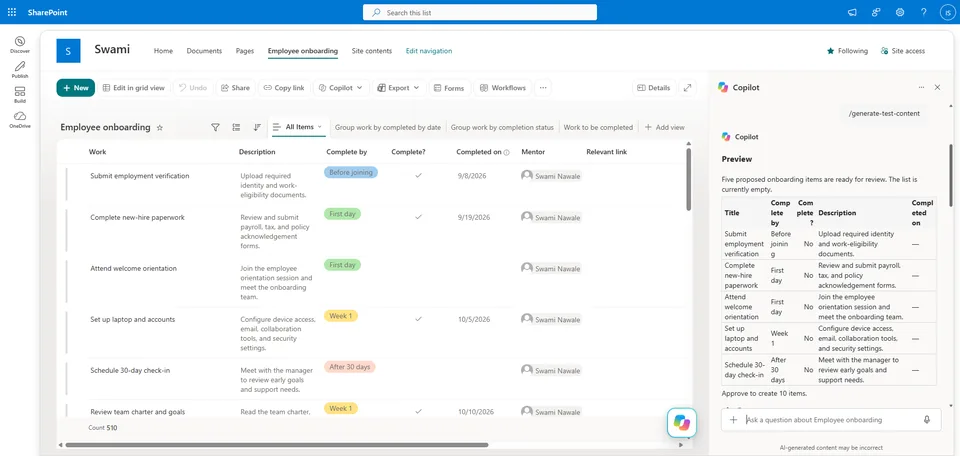
Prepares exactly five representative proposed items as a preview and asks for approval before creating anything. After approval, creates the requested number of items (default: 10) and verifies the create operation, reporting back a concise inventory of what was created.
Generates realistic test content for SharePoint lists and document libraries. Inspects the current list or library structure, previews five proposed items, and creates the requested number (default: 10) after approval.
What you get
- Automatic detection of whether the current location is a list or a document library
- Dummy content that matches the real column schema, field types, and choices of a list — or realistic Word, Excel, PowerPoint, PDF, or other requested document formats for a library
- A five-item preview table shown for approval before anything is created
- Creation of the approved count (your requested number, or 10 by default) after you approve
- A verified completion summary with an inventory of what was created
When to use
Ask Copilot:
- "add test data"
- "create dummy data"
- "populate this list with sample items"
- "create dummy documents"
- "add sample records to this SharePoint list"
Works on any SharePoint list or document library open in the current context.
SharePoint Skill
| Solution | Author(s) |
|---|---|
| generate-test-content | Swami Nawale | GitHub | LinkedIn |
Version history
| Version | Date | Comments |
|---|---|---|
| 1.0 | October 2026 | Initial Release |
Disclaimer
THIS CODE IS PROVIDED AS IS WITHOUT WARRANTY OF ANY KIND, EITHER EXPRESS OR IMPLIED, INCLUDING ANY IMPLIED WARRANTIES OF FITNESS FOR A PARTICULAR PURPOSE, MERCHANTABILITY, OR NON-INFRINGEMENT.
Package
Ready to install
The ZIP contains only the upload-ready inner skill folder.
2a7fbe0dcac10279f240661794cf5f257efdbbf38ceddb58bc5957bc16dee1b3View SKILL.md
---
name: generate-test-content
description: |-
  Generate realistic test content for SharePoint lists and document libraries. Inspect the current list or library structure, preview five proposed items, and create the requested number after approval (default: 10).

  Use when the user says:
  - "add test data"
  - "create dummy data"
  - "populate this list with sample items"
  - "create dummy documents"
  - "add sample records to this SharePoint list"
---
# Generate Test Content

## When to use
Use this skill when a user asks to add realistic dummy, sample, or test content to the current SharePoint list or document library.

## Inputs
- Current SharePoint list or document library.
- Requested item count. Default to 10 when the user doesn't specify a number.
- For document libraries, the document type or types required. Ask the user before preparing the preview if they haven't specified it.

## Steps
1. Identify whether the current location is a SharePoint list or document library.
2. For a list, inspect the real column schema and sample values before drafting content. Create realistic values that match the actual field types, required fields, choices, lookup/person fields, and list purpose. Format every date value as `M/d/yyyy`.
3. For a document library, ask which document type or types the user needs when not already specified. Support realistic dummy Word, Excel, PowerPoint, PDF, or other requested document formats. Use descriptive filenames and content appropriate to the library's apparent purpose.
4. Prepare exactly five representative proposed items as a preview. Do not create files or list items yet.
5. Show the five-item preview in a table. For list items, show the key fields and values. For documents, show filename, type, and a short content summary.
6. Ask for approval after the preview. State the total that will be created: the user-requested quantity, or 10 by default.
7. Only after approval, create the requested number of entries or documents. If the user hasn't specified a number, create 10.
8. Verify the create operation succeeded and report the number created along with a concise inventory. If creation partially fails, state exactly what was created and what failed; don't claim success for missing items.

## Output format
### Preview
State that five proposed items are ready for review, then provide a table.

For a list:
| Title | Key field 1 | Key field 2 | Date |
|---|---|---|---|

For a document library:
| Filename | Type | Content summary |
|---|---|---|

End with: `Approve to create N items.` where `N` is the requested count or 10 by default.

### Completion
State the verified number created. List the created items in a table when there are 20 or fewer; otherwise provide the total and a five-item sample.

## Constraints
- Never create content before the user approves the five-item preview.
- Use the current list or library's real structure; don't invent unsupported metadata or field values.
- Treat a user-specified count as authoritative; otherwise use 10.
- For document libraries, don't assume a document format: ask if it isn't provided.
- Keep all dummy content realistic and clearly suitable as test data.
- If a tool fails or returns empty, say so plainly and don't invent content.

## Examples
- "Add test data to this list" → inspect the schema, preview five records, then create 10 after approval.
- "Create 25 dummy Word and Excel documents in this library" → preview five document proposals, then create 25 after approval.
- "Populate this list with 8 sample items" → preview five records using its actual columns, then create 8 after approval.
References
- agentskills.io specification
The specification that SharePoint AI skills follow for installation and discovery.
Discuss this skill
Ask a question, share how you used it, or suggest an improvement with the community.
Open GitHub Discussions