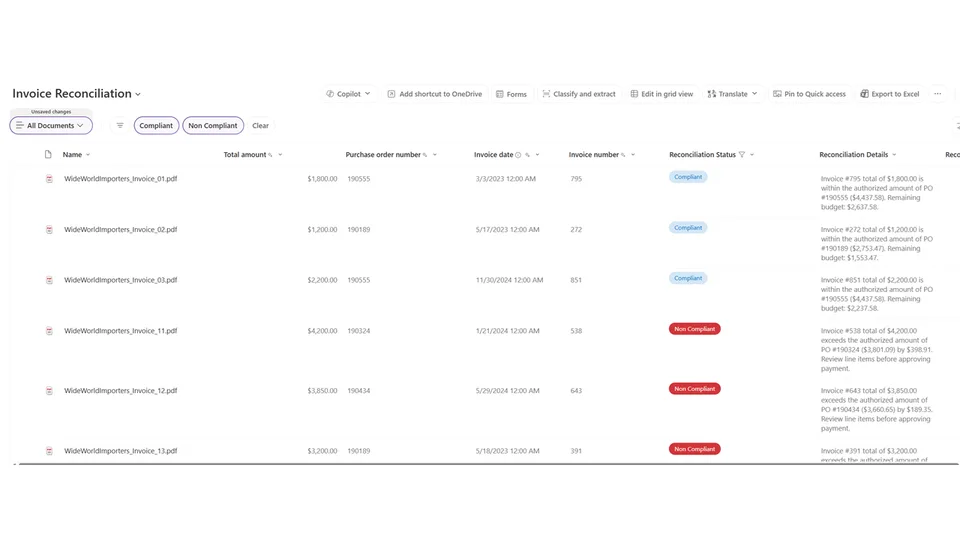
Automates the procure-to-pay reconciliation step that teams normally do by hand or with custom Power Automate flows. For each selected invoice, the skill reads the invoice metadata (or extracts it from the file content), locates the matching PO in the Purchase Order library by PO Number, and compares totals to determine whether the invoice is Compliant or Non Compliant.
Writes Reconciliation Status and Reconciliation Details back to the invoice item, then returns a Markdown summary table showing Invoice #, Invoice Total, PO #, PO Total, Status (Compliant / Non Compliant / No Match), and the remaining budget or overage amount. Trigger phrases include 'reconcile invoice', 'invoice to po reconciliation', 'match invoice to po', and 'check invoice against po'.
Reconciles one or more user-selected invoice files against their matching purchase orders in the Purchase Order library. Reads invoice and PO totals from metadata or file content, compares them, writes reconciliation status back to invoice metadata, and returns a formatted summary table — no Power Automate, no custom code.
What you get
- Automatic match between each selected invoice and its PO record in the Purchase Order library, by PO Number
- A Compliant / Non Compliant verdict per invoice based on Invoice Total vs PO Total
- Remaining-budget or overage amount calculated and surfaced in plain English
Reconciliation StatusandReconciliation Detailscolumns written back on the invoice item- A single Markdown summary table covering every reconciled invoice in the run
- Graceful fallbacks when metadata columns are missing — the skill reads the file content instead
When to use
Ask Copilot any of the following (or close variations):
- "reconcile invoice"
- "invoice to po reconciliation"
- "po reconciliation"
- "match invoice to po"
- "check invoice against po"
- "invoice po match"
- "compare invoice to po"
Have the invoice file (or files) selected in the document library before triggering — the skill needs a selection to know what to reconcile.
Prerequisites
- A SharePoint document library containing invoice files.
- A separate Purchase Order library (or one named
Purchase Orders/PO) containing the matching PO records. - Recommended columns on the invoice library:
Invoice Number,Invoice Total,PO Number. The skill will read content from the file if these are empty. - Recommended columns on the PO library:
PO Number,PO Total. Same content-fallback applies.
SharePoint Skill
| Solution | Author(s) |
|---|---|
| invoice-po-reconciliation | Arbindo Chattopadhyay | GitHub | LinkedIn |
Version history
| Version | Date | Comments |
|---|---|---|
| 1.0 | May 2026 | Initial Release |
Demo videos
The first demo shows the skill in action:
Invoice to PO Reconciliation with Skills in SharePoint — Watch on YouTube
The second demo walks through how the skill was created:
Creating a Skill in SharePoint for Invoice to PO Reconciliation — Watch on YouTube
Disclaimer
THIS CODE IS PROVIDED AS IS WITHOUT WARRANTY OF ANY KIND, EITHER EXPRESS OR IMPLIED, INCLUDING ANY IMPLIED WARRANTIES OF FITNESS FOR A PARTICULAR PURPOSE, MERCHANTABILITY, OR NON-INFRINGEMENT.
Package
Ready to install
The ZIP contains only the upload-ready inner skill folder.
f44fd40ffdb9cf824904228702e72b357c800a92f60e26b14069b378b4668810View SKILL.md
---
name: invoice-po-reconciliation
description: Reconciles one or more user-selected invoice files against matching purchase orders in the Purchase Order library. Compares totals, flags discrepancies, writes reconciliation status back to invoice metadata, and returns a formatted summary table. Trigger phrases: po reconciliation, invoice reconciliation, invoice to po reconciliation, reconcile invoice, reconcile po, match invoice to po, invoice po match, po match, check invoice against po.
---
# Invoice vs. Purchase Order Reconciliation

## Purpose
Reconcile one or more user-selected invoice files against their corresponding purchase orders (POs). Determine compliance by comparing totals, write results back to invoice metadata, and return a clear summary.

## Trigger Phrases
Activate this skill when the user says any of the following (or close variations):
- "po reconciliation"
- "invoice reconciliation"
- "reconcile invoice"
- "invoice to po reconciliation"
- "reconcile po"
- "match invoice to po"
- "invoice po match"
- "check invoice against po"
- "po match"
- "compare invoice to po"

## Prerequisites
- The user must have **one or more invoice files selected** in a document library.
- If no files are selected, ask the user to select the invoice file(s) they want to reconcile.

## Steps (repeat for each selected invoice)

### Step 1 — Read Invoice Metadata
Use `cat_file` or `list_items` (with field projection) to read the selected invoice file's metadata columns. Look for:
- **Invoice Number**
- **Invoice Total** (or Amount, Total, Invoice Amount — adapt to actual column name)
- **PO Number** (or Purchase Order Number, Referenced PO — adapt to actual column name)

If the library has metadata columns populated, extract the values directly.

If metadata columns are missing or empty, read the file content with `cat_file` and extract Invoice Number, Invoice Total, and PO Number from the document body.

### Step 2 — Find the Matching Purchase Order
Search the **Purchase Order** library (also try "Purchase Orders" or "PO" if not found) for a record whose PO Number column matches the PO Number extracted from the invoice.

- **Primary method**: Use `list_items` with a filter on the PO Number column.
- **Fallback method**: If the library doesn't have a clear PO Number column or the filter returns no results, use `find_items` or `semantic_search` to locate the PO by PO number.

If no matching PO is found, report the invoice as **Unable to Reconcile — No matching PO found** and move to the next invoice.

### Step 3 — Extract PO Details
From the matching PO record, extract:
- **PO Number**
- **PO Total** (or PO Amount, Total, Order Total — adapt to actual column name)

If PO Total is not available in metadata, read the PO file content with `cat_file` to extract the total.

### Step 4 — Reconcile
Perform two checks:

1. **PO Number Match**: Confirm the PO Number from the invoice exactly matches the PO Number on the PO record. Any mismatch (e.g., trailing characters, prefix differences) = **Discrepancy**.

2. **Total Comparison**:
   - If **Invoice Total > PO Total** → **Non Compliant** (overage = Invoice Total − PO Total)
   - If **Invoice Total ≤ PO Total** → **Compliant** (remaining budget = PO Total − Invoice Total)

### Step 5 — Write Back to Invoice Metadata
Use `update_list_items_v2` to write the following columns on the invoice item. If the columns don't exist yet, note that to the user and skip the write-back.

| Column | Value |
|---|---|
| **Reconciliation Status** | `Compliant` or `Non Compliant` |
| **Reconciliation Details** | Plain-English summary, e.g., *"Invoice #1042 ($4,800.00) matched to PO #PO-1042 ($5,000.00). Invoice is within PO budget. Remaining: $200.00."* or *"Invoice #1043 ($6,200.00) exceeds PO #PO-1043 ($5,000.00) by $1,200.00."* |

### Step 6 — Return Summary to User
After processing all invoices, return a single formatted Markdown table:

| Invoice # | Invoice Total | PO # | PO Total | Status | Details |
|---|---|---|---|---|---|
| 1042 | $4,800.00 | PO-1042 | $5,000.00 | ✅ Compliant | Remaining budget: $200.00 |
| 1043 | $6,200.00 | PO-1043 | $5,000.00 | ⚠️ Non Compliant | Overage: $1,200.00 |
| 1044 | $3,500.00 | PO-9999 | — | ❌ No Match | No matching PO found |

Use these status indicators:
- ✅ **Invoice is Compliant** — Invoice total is at or below PO total. Show remaining budget.
- ⚠️ **Discrepancy Found** — Invoice total exceeds PO total. Show overage amount.
- ❌ **Unable to Reconcile** — No matching PO found or PO number mismatch.

## Example

**User**: "Reconcile this invoice against its PO"
*(User has selected: Invoice-1042.pdf)*

**Agent response after processing**:

> I read Invoice-1042.pdf and found Invoice #1042 for **$4,800.00** referencing **PO-1042**. I located PO-1042 in the Purchase Order library with a total of **$5,000.00**.
>
> | Invoice # | Invoice Total | PO # | PO Total | Status | Details |
> |---|---|---|---|---|---|
> | 1042 | $4,800.00 | PO-1042 | $5,000.00 | ✅ Compliant | Remaining budget: $200.00 |
>
> I updated the invoice metadata with Reconciliation Status = **Compliant** and the reconciliation details.

## Constraints
- Never fabricate invoice or PO data. All values must come from actual file content or metadata.
- If a column name doesn't match exactly (e.g., "Amount" vs "Invoice Total"), adapt by inspecting the list schema with `get_list_schema` first.
- If the Purchase Order library can't be found on the site, ask the user which library contains the POs.
- If write-back columns (Reconciliation Status, Reconciliation Details) don't exist on the invoice library, inform the user and offer to create them.
- Format all currency values with two decimal places and a dollar sign.
- Process invoices in the order they were selected.
References
- agentskills.io specification
The specification that SharePoint AI skills follow for installation and discovery.
- Demo: Invoice to PO Reconciliation with Skills in SharePoint
YouTube walkthrough showing the skill in action.
- Demo: Creating the Skill in SharePoint for Invoice to PO Reconciliation
YouTube walkthrough showing how the skill was built.
Discuss this skill
Ask a question, share how you used it, or suggest an improvement with the community.
Open GitHub Discussions